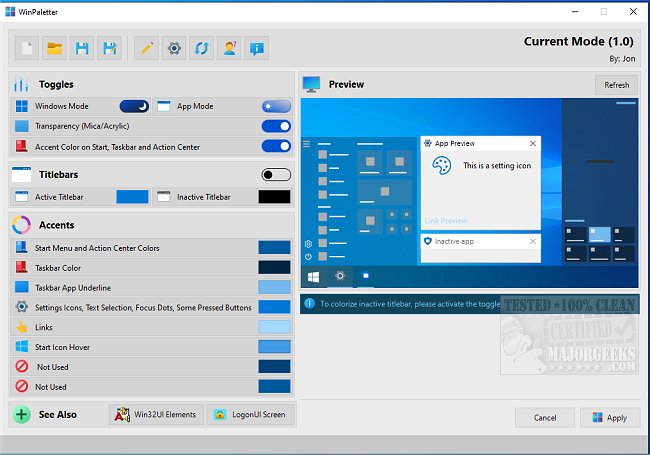
WinPaletter has released versions 1.0.9.8 Beta and 1.0.9.7, allowing users to easily customize the accent colors of Windows 10 and 11. The application features a user-friendly interface that simplifies the personalization of desktop appearances, enabling changes to title bars, accents, and more. Users can preview their adjustments before applying them, ensuring harmonious color schemes.
Accent colors are managed through the Windows registry, with some stored as arrays and others as individual values, making the process seamless. WinPaletter also allows users to save their color combinations as theme files, enabling the creation of multiple themes tailored for different tasks. Additionally, it offers accessibility benefits by providing higher contrast options for users with vision impairments.
WinPaletter is an excellent tool for enhancing the visual experience of a Windows machine, catering to users of all levels of expertise.
In extending this, it would be beneficial to highlight potential use cases for WinPaletter, such as creating themes for different moods, seasons, or events. Users might also find it useful for establishing a professional look for work-related tasks or a more vibrant appearance for gaming setups. Furthermore, the ability to share theme files with others could foster a community of users who exchange design ideas and inspiration, leading to a more personalized and visually appealing Windows experience for everyone
Accent colors are managed through the Windows registry, with some stored as arrays and others as individual values, making the process seamless. WinPaletter also allows users to save their color combinations as theme files, enabling the creation of multiple themes tailored for different tasks. Additionally, it offers accessibility benefits by providing higher contrast options for users with vision impairments.
WinPaletter is an excellent tool for enhancing the visual experience of a Windows machine, catering to users of all levels of expertise.
In extending this, it would be beneficial to highlight potential use cases for WinPaletter, such as creating themes for different moods, seasons, or events. Users might also find it useful for establishing a professional look for work-related tasks or a more vibrant appearance for gaming setups. Furthermore, the ability to share theme files with others could foster a community of users who exchange design ideas and inspiration, leading to a more personalized and visually appealing Windows experience for everyone
WinPaletter 1.0.9.8 Beta / 1.0.9.7 released
WinPaletter enables you to colorize Windows 10 and 11 accents without restrictions from an easy-to-use interface.