WinNTSetup version 5.4.2 has been released, offering an advanced solution for users looking to customize their Windows operating system installations. This tool is especially beneficial for system administrators and IT professionals involved in mass deployment, allowing them to configure multiple installations across various devices efficiently. The utility supports both 32-bit and 64-bit versions, ensuring broad compatibility.
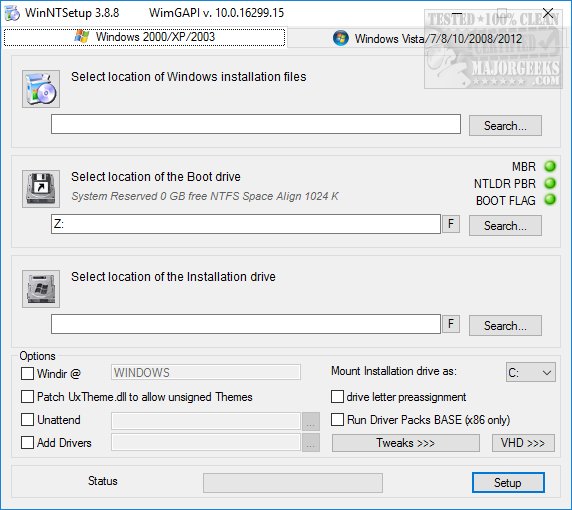
The software simplifies the installation process by enabling users to adjust settings such as installation sources, system drivers, and updates, thereby aligning deployments with specific organizational requirements. Its intuitive interface is divided into two main tabs catering to Windows 7 and newer versions, as well as older versions like Windows 2000, XP, and 2003. Users can benefit from balloon tips that provide helpful information when hovering over different options.
During setup, users are prompted to download the Windows Assessment and Deployment Kit (Windows ADK), a small application essential for the installation process. Key features include selecting the installation files, boot drive, and installation drive locations. Additionally, users can access a range of options like patching UxTheme.dll, performing unattended installations, adding drivers, pre-assigning drive letters, and applying various tweaks.
While the settings menu offers 25 additional tweaks, many are tailored to older operating systems. Users of Windows 10 and 11 may find the absence of contemporary tweaks—such as privacy enhancements, disabling Cortana, and disabling indexing for faster drive access—disappointing. However, the option to import registry tweaks remains a valuable feature.
It is important to note that Windows Embedded is not supported, and USB drive installations are limited to Windows 10, 8, and 7. Overall, WinNTSetup proves to be an excellent tool for mass-deploying Windows versions efficiently, despite some limitations regarding more recent customization options.
In future updates, it would be beneficial for the developers to include more current tweaks that address privacy concerns and enhance user experience for Windows 10 and 11, ensuring that the software remains relevant and valuable to users who prioritize modern system configurations
The software simplifies the installation process by enabling users to adjust settings such as installation sources, system drivers, and updates, thereby aligning deployments with specific organizational requirements. Its intuitive interface is divided into two main tabs catering to Windows 7 and newer versions, as well as older versions like Windows 2000, XP, and 2003. Users can benefit from balloon tips that provide helpful information when hovering over different options.
During setup, users are prompted to download the Windows Assessment and Deployment Kit (Windows ADK), a small application essential for the installation process. Key features include selecting the installation files, boot drive, and installation drive locations. Additionally, users can access a range of options like patching UxTheme.dll, performing unattended installations, adding drivers, pre-assigning drive letters, and applying various tweaks.
While the settings menu offers 25 additional tweaks, many are tailored to older operating systems. Users of Windows 10 and 11 may find the absence of contemporary tweaks—such as privacy enhancements, disabling Cortana, and disabling indexing for faster drive access—disappointing. However, the option to import registry tweaks remains a valuable feature.
It is important to note that Windows Embedded is not supported, and USB drive installations are limited to Windows 10, 8, and 7. Overall, WinNTSetup proves to be an excellent tool for mass-deploying Windows versions efficiently, despite some limitations regarding more recent customization options.
In future updates, it would be beneficial for the developers to include more current tweaks that address privacy concerns and enhance user experience for Windows 10 and 11, ensuring that the software remains relevant and valuable to users who prioritize modern system configurations
WinNTSetup 5.4.2 released
WinNTSetup is a powerful tool designed to enable users to customize their Windows operating system configurations before installation. 32-bit is also available.