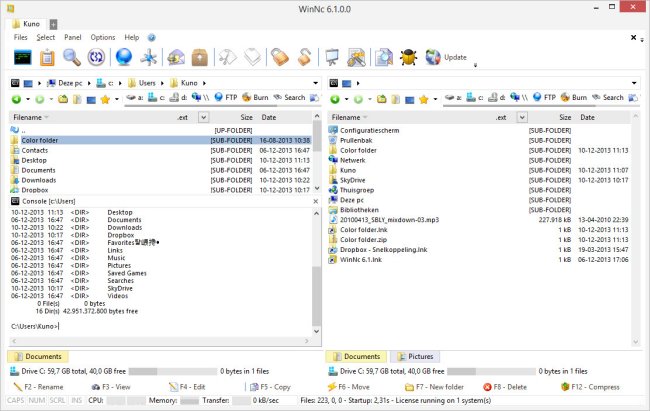
WinNc 11.4.0.0 has been released, continuing its legacy as a clone of the classic Norton Commander file manager. This software utilizes a dual-panel design inspired by Norton Commander's interface, facilitating efficient file management. WinNc features shortcuts to various Windows special folders and incorporates a tabbed interface that enables users to organize their files and folders into specific projects, allowing for a streamlined workflow.
In addition to performing standard file management tasks such as copying, moving, deleting, compressing, and creating links, WinNc also offers advanced functionalities. Users can convert audio files, burn data onto CD and DVD, create ISO files, and synchronize files across different locations. This blend of basic and advanced features makes WinNc a versatile tool for users looking to manage their files effectively.
For those interested in enhancing their file management skills, resources such as guides on resetting folder view settings in Windows 10 & 11, comprehensive lists of keyboard shortcuts for File Explorer, and methods to restart File Explorer without rebooting are also available.
As technology continues to evolve, the demand for robust file management solutions like WinNc remains significant, addressing the needs of both casual users and professionals. The software not only pays homage to its predecessor but also adapts to modern requirements, ensuring it stays relevant in today's digital landscape
In addition to performing standard file management tasks such as copying, moving, deleting, compressing, and creating links, WinNc also offers advanced functionalities. Users can convert audio files, burn data onto CD and DVD, create ISO files, and synchronize files across different locations. This blend of basic and advanced features makes WinNc a versatile tool for users looking to manage their files effectively.
For those interested in enhancing their file management skills, resources such as guides on resetting folder view settings in Windows 10 & 11, comprehensive lists of keyboard shortcuts for File Explorer, and methods to restart File Explorer without rebooting are also available.
As technology continues to evolve, the demand for robust file management solutions like WinNc remains significant, addressing the needs of both casual users and professionals. The software not only pays homage to its predecessor but also adapts to modern requirements, ensuring it stays relevant in today's digital landscape
WinNc 11.4.0.0 released
WinNc is a Norton Commander clone file manager inspired by the old file manager Norton Commander's dual panel concept.