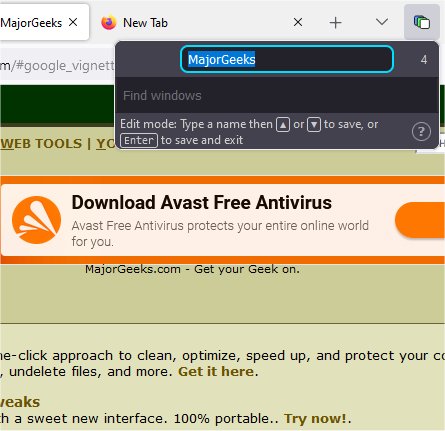
Winger for Firefox is an innovative add-on designed to enhance your browsing experience by allowing you to efficiently manage multiple windows and tabs. With the latest release, version 2.12.0, Winger introduces a host of features that make it easier to organize your browsing sessions. Users can name their windows, move tabs between them, and stash windows for later use, thereby streamlining their workflow.
The add-on is particularly useful for those who juggle numerous tabs across various projects or topics. Winger enables users to label their windows according to the task at hand, providing a clear organizational structure. The interface is user-friendly and accessible, allowing users to interact with a searchable list of window names effortlessly, whether by mouse or keyboard.
Key Features:
1. Intuitive Accessibility: Accessing Winger is as simple as remembering a single keyboard shortcut (F1 by default). Once activated, users can utilize pre-defined slash commands in an omnibox to perform various functions.
2. Task Simplification: Winger simplifies common tasks such as naming, switching, and transferring tabs. Users can move tabs seamlessly between windows using the 'send' and 'bring' options, and the Ctrl and Shift keys can be utilized to modify these actions.
3. Private Window Support: The add-on supports private browsing by enabling users to move tabs between private and regular windows. Winger automatically reopens tabs in the appropriate window, enhancing usability and privacy.
4. Window Stashing: Users can stash windows for future access, with these stashed windows saved as bookmark folders. This feature is particularly beneficial for users who need to close their windows but want to retain access to their tabs later. Stashed windows can also be synced across devices via bookmark syncing.
5. Enhanced Tab Management: Winger allows users to send or bring tabs using a right-click context menu, enabling quick actions without disrupting the browsing flow. Minimized windows are grouped at the end to facilitate organization, particularly for MacOS users where this aligns with the operating system's native window management.
Winger for Firefox is designed with user-friendliness in mind, making it suitable for individuals who may not be tech-savvy. Its smooth integration into the Firefox experience helps users improve productivity by managing their tabs and windows more effectively.
Conclusion: For anyone looking to enhance their browsing experience, Winger for Firefox presents a compelling option for efficient window and tab management. Whether you're a casual user or someone who frequently handles multiple projects, Winger can help streamline your workflow and improve overall productivity.
Additionally, users might find it beneficial to explore related topics like restoring accidentally closed browser tabs, muting tabs in various browsers, and optimizing browser performance for a more efficient browsing experience
The add-on is particularly useful for those who juggle numerous tabs across various projects or topics. Winger enables users to label their windows according to the task at hand, providing a clear organizational structure. The interface is user-friendly and accessible, allowing users to interact with a searchable list of window names effortlessly, whether by mouse or keyboard.
Key Features:
1. Intuitive Accessibility: Accessing Winger is as simple as remembering a single keyboard shortcut (F1 by default). Once activated, users can utilize pre-defined slash commands in an omnibox to perform various functions.
2. Task Simplification: Winger simplifies common tasks such as naming, switching, and transferring tabs. Users can move tabs seamlessly between windows using the 'send' and 'bring' options, and the Ctrl and Shift keys can be utilized to modify these actions.
3. Private Window Support: The add-on supports private browsing by enabling users to move tabs between private and regular windows. Winger automatically reopens tabs in the appropriate window, enhancing usability and privacy.
4. Window Stashing: Users can stash windows for future access, with these stashed windows saved as bookmark folders. This feature is particularly beneficial for users who need to close their windows but want to retain access to their tabs later. Stashed windows can also be synced across devices via bookmark syncing.
5. Enhanced Tab Management: Winger allows users to send or bring tabs using a right-click context menu, enabling quick actions without disrupting the browsing flow. Minimized windows are grouped at the end to facilitate organization, particularly for MacOS users where this aligns with the operating system's native window management.
Winger for Firefox is designed with user-friendliness in mind, making it suitable for individuals who may not be tech-savvy. Its smooth integration into the Firefox experience helps users improve productivity by managing their tabs and windows more effectively.
Conclusion: For anyone looking to enhance their browsing experience, Winger for Firefox presents a compelling option for efficient window and tab management. Whether you're a casual user or someone who frequently handles multiple projects, Winger can help streamline your workflow and improve overall productivity.
Additionally, users might find it beneficial to explore related topics like restoring accidentally closed browser tabs, muting tabs in various browsers, and optimizing browser performance for a more efficient browsing experience
Winger for Firefox 2.12.0 released
Winger for Firefox lets you name windows, move tabs between windows, stash windows away, and more.