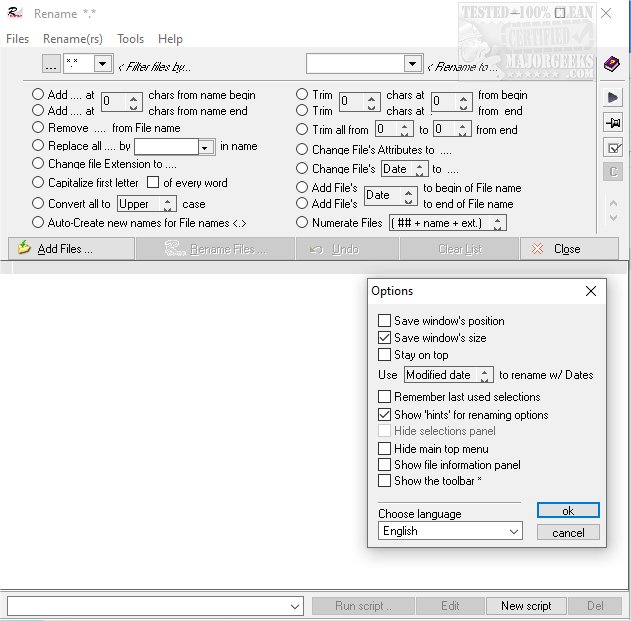
The latest version of webXpace File Renamer, 1.26.0, has been released, offering a comprehensive solution for renaming files, folders, and shortcuts. This tool provides users with a wide array of options, allowing for sequential enumeration of files, batch renaming, string replacement, string modification, date changes, and file attribute adjustments.
One of the standout features is the support for drag-and-drop functionality from Windows Explorer, making it user-friendly. Additionally, the software includes an 'infinite undo' feature, ensuring that users can revert any changes safely. For those needing more advanced capabilities, the program allows for the creation of custom scripts, enabling users to combine various options for complex renaming tasks.
While the user interface may appear simplistic, it is packed with essential features that make it a powerful renaming tool. Users can take advantage of this software to streamline their file management processes effectively.
In addition to its core functionalities, webXpace File Renamer can be complemented by resources and tips for enhancing file management, such as resetting folder view settings in Windows 10, utilizing keyboard shortcuts in File Explorer, and methods to restart File Explorer without a complete system reboot. These additional tips can help users maximize their efficiency when navigating and organizing files on their systems
One of the standout features is the support for drag-and-drop functionality from Windows Explorer, making it user-friendly. Additionally, the software includes an 'infinite undo' feature, ensuring that users can revert any changes safely. For those needing more advanced capabilities, the program allows for the creation of custom scripts, enabling users to combine various options for complex renaming tasks.
While the user interface may appear simplistic, it is packed with essential features that make it a powerful renaming tool. Users can take advantage of this software to streamline their file management processes effectively.
In addition to its core functionalities, webXpace File Renamer can be complemented by resources and tips for enhancing file management, such as resetting folder view settings in Windows 10, utilizing keyboard shortcuts in File Explorer, and methods to restart File Explorer without a complete system reboot. These additional tips can help users maximize their efficiency when navigating and organizing files on their systems
webXpace File Renamer 1.26.0 released
webXpace File Renamer will rename all your files, folders, and shortcuts, with all shapes and options you will ever need.