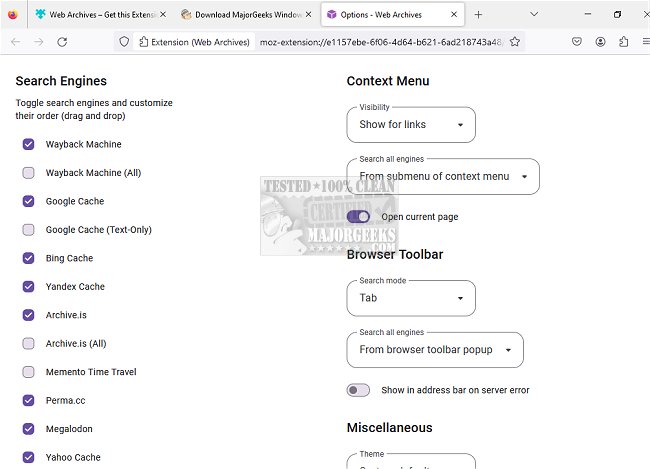
The recently released version 7.2.0 of Web Archives is a versatile browser extension that works across popular web browsers including Chrome, Firefox, Edge, Opera, and Safari. This tool enables users to easily access archived and cached versions of websites they visit. It supports a variety of prominent search engines such as the Wayback Machine, Google, Bing, Yandex, and Archive.is, among others.
With Web Archives, users can quickly retrieve the most recent saved versions of webpages, making it a valuable resource when a website fails to load or when specific content is no longer available. By clicking on the extension, users can instantly open a new tab that showcases the archived version of the current page or a URL they input manually.
The extension offers two primary search modes: the default 'Tab' mode, which searches for the page currently opened in the active tab, and the 'URL' mode, which allows users to search for a custom URL. Users can also initiate searches across all supported engines simultaneously, resulting in multiple new tabs opening at once, or they can select a specific search engine via the Web Archives icon.
This tool enhances the browsing experience by providing easy access to historical content, making it particularly useful for researchers, students, and anyone interested in retrieving information that may not be readily available on the current web. As digital content continues to evolve and change, tools like Web Archives play a crucial role in preserving and accessing past information effectively.
In future updates, it would be beneficial for the developers to consider integrating more advanced features such as user-customizable settings for preferred search engines, enhanced filtering options for search results, and improved compatibility with additional web browsers. This would further enhance the user experience and broaden the extension's appeal to a wider audience
With Web Archives, users can quickly retrieve the most recent saved versions of webpages, making it a valuable resource when a website fails to load or when specific content is no longer available. By clicking on the extension, users can instantly open a new tab that showcases the archived version of the current page or a URL they input manually.
The extension offers two primary search modes: the default 'Tab' mode, which searches for the page currently opened in the active tab, and the 'URL' mode, which allows users to search for a custom URL. Users can also initiate searches across all supported engines simultaneously, resulting in multiple new tabs opening at once, or they can select a specific search engine via the Web Archives icon.
This tool enhances the browsing experience by providing easy access to historical content, making it particularly useful for researchers, students, and anyone interested in retrieving information that may not be readily available on the current web. As digital content continues to evolve and change, tools like Web Archives play a crucial role in preserving and accessing past information effectively.
In future updates, it would be beneficial for the developers to consider integrating more advanced features such as user-customizable settings for preferred search engines, enhanced filtering options for search results, and improved compatibility with additional web browsers. This would further enhance the user experience and broaden the extension's appeal to a wider audience
Web Archives for Chrome, Firefox, Edge, Opera, and Safari 7.2.0 released
Web Archives for Chrome, Firefox, Edge, Opera, and Safari allows access to cached versions of websites on multiple popular search engines, including the Wayback Machine, Google, and Bing.
Web Archives for Chrome, Firefox, Edge, Opera, and Safari 7.2.0 released @ MajorGeeks