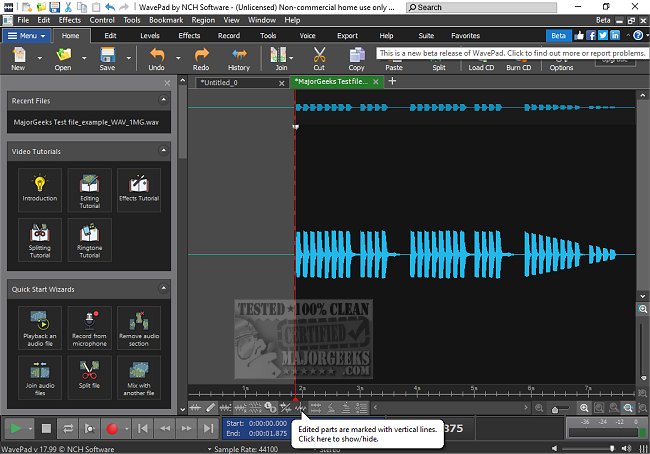
WavePad, an advanced audio editing software developed by NCH Software, has recently released its version 24.12, enhancing its already robust suite of features tailored for both professionals and audio enthusiasts. This comprehensive audio editor addresses a wide variety of audio editing needs, from music production to podcasting, making it suitable for users of all experience levels.
Why Choose WavePad?
WavePad stands out in the market due to its user-friendly interface and powerful tools, allowing users to perform tasks ranging from simple edits, such as trimming, to intricate sound restoration processes. The software supports numerous file formats, ensuring flexibility in audio editing. Notably, it excels in noise reduction, reverb application, and batch processing, which are essential for users working on multiple files simultaneously.
Key Features of WavePad
WavePad is equipped with an extensive array of editing capabilities, including:
- Basic editing tools: cut, copy, paste, delete, insert, silence, auto-trim, and pitch shifting.
- Effects: amplify, normalize, equalizer, envelope, reverb, echo, and reverse.
- VST plugin support for further customization.
- Batch processing for handling multiple audio files efficiently.
- Advanced features: spectral analysis (FFT), voice changing, and speech synthesis.
- Audio restoration tools: noise reduction, click/pop removal, and hum elimination.
- Video integration: extract or edit audio from video files.
- A library of royalty-free sounds and music clips.
- Cross-platform availability on Windows, macOS, iOS, Android, and Kindle.
Pros and Cons of WavePad
Pros:
- Intuitive interface with powerful functionalities.
- Extensive support for various audio file formats.
- Advanced capabilities such as spectral analysis and batch processing.
- VST plugin compatibility for enhanced audio production.
- Multi-platform support for versatile editing.
Cons:
- The free version is limited in advanced features.
- The interface may appear somewhat outdated compared to newer software, though it remains user-friendly.
- Certain tools are restricted to the Master's Edition, requiring an upgrade for access.
Conclusion
WavePad emerges as a highly recommended audio editor, ideal for both casual users and professionals seeking a reliable tool with an accessible learning curve. The free version offers basic functionalities, while the Master's Edition provides access to advanced features, making it a worthwhile investment for serious audio projects. Overall, WavePad is a comprehensive solution for anyone looking to enhance their audio editing capabilities.
Additional Resources
For users interested in further enhancing their audio experience, consider exploring topics such as enabling Windows Sonic Surround Sound, diagnosing sound delays in Windows, or troubleshooting low computer sound volume
Why Choose WavePad?
WavePad stands out in the market due to its user-friendly interface and powerful tools, allowing users to perform tasks ranging from simple edits, such as trimming, to intricate sound restoration processes. The software supports numerous file formats, ensuring flexibility in audio editing. Notably, it excels in noise reduction, reverb application, and batch processing, which are essential for users working on multiple files simultaneously.
Key Features of WavePad
WavePad is equipped with an extensive array of editing capabilities, including:
- Basic editing tools: cut, copy, paste, delete, insert, silence, auto-trim, and pitch shifting.
- Effects: amplify, normalize, equalizer, envelope, reverb, echo, and reverse.
- VST plugin support for further customization.
- Batch processing for handling multiple audio files efficiently.
- Advanced features: spectral analysis (FFT), voice changing, and speech synthesis.
- Audio restoration tools: noise reduction, click/pop removal, and hum elimination.
- Video integration: extract or edit audio from video files.
- A library of royalty-free sounds and music clips.
- Cross-platform availability on Windows, macOS, iOS, Android, and Kindle.
Pros and Cons of WavePad
Pros:
- Intuitive interface with powerful functionalities.
- Extensive support for various audio file formats.
- Advanced capabilities such as spectral analysis and batch processing.
- VST plugin compatibility for enhanced audio production.
- Multi-platform support for versatile editing.
Cons:
- The free version is limited in advanced features.
- The interface may appear somewhat outdated compared to newer software, though it remains user-friendly.
- Certain tools are restricted to the Master's Edition, requiring an upgrade for access.
Conclusion
WavePad emerges as a highly recommended audio editor, ideal for both casual users and professionals seeking a reliable tool with an accessible learning curve. The free version offers basic functionalities, while the Master's Edition provides access to advanced features, making it a worthwhile investment for serious audio projects. Overall, WavePad is a comprehensive solution for anyone looking to enhance their audio editing capabilities.
Additional Resources
For users interested in further enhancing their audio experience, consider exploring topics such as enabling Windows Sonic Surround Sound, diagnosing sound delays in Windows, or troubleshooting low computer sound volume
Wavepad 24.12 released
WavePad is an advanced audio editing software that offers a wide range of features for professionals and enthusiasts alike.