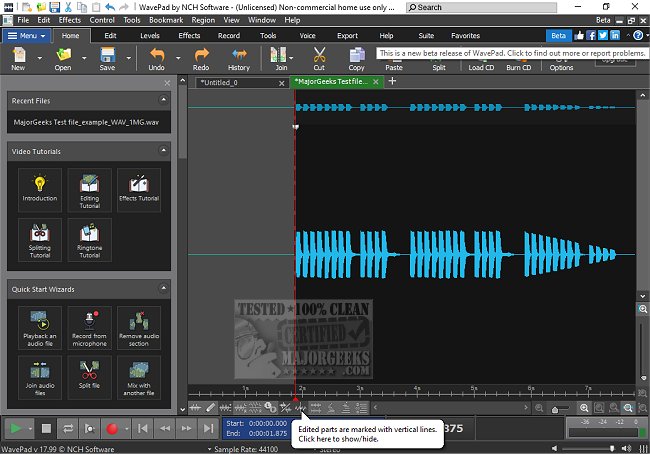
WavePad, developed by NCH Software, is a comprehensive audio editing software that caters to both professionals and hobbyists. The recent release of WavePad 24.02 Beta highlights its commitment to providing an advanced yet user-friendly audio editing experience.
Key Features of WavePad:
WavePad stands out for its extensive range of features, making it suitable for various audio editing needs, including music production, podcasting, and sound restoration. Users can perform essential tasks such as cutting, copying, and pasting, as well as applying effects like amplification, normalization, and reverb. The software supports a multitude of audio formats, including MP3, WAV, FLAC, and more, allowing for versatile editing options.
In addition to basic editing capabilities, WavePad includes advanced tools such as spectral analysis and voice changing, enabling intricate audio manipulation. The software also offers batch processing, which is particularly advantageous for users dealing with large volumes of files. With features like noise reduction and click/pop removal, WavePad assists in enhancing audio quality, making it ideal for content creators seeking professional results.
User Experience:
The interface of WavePad is designed to be straightforward, ensuring accessibility for users at all experience levels. While some may find the interface slightly outdated compared to newer software, its usability remains intact. The free version provides a good starting point; however, users seeking advanced features will need to upgrade to the Master's Edition.
Pros and Cons:
*Pros:*
- Intuitive interface combined with powerful editing tools.
- Support for a wide array of audio formats.
- Advanced features such as spectral analysis and batch processing capabilities.
- Compatibility with VST plugins for enhanced audio effects.
- Availability across multiple operating systems, including Windows, macOS, iOS, Android, and Kindle.
*Cons:*
- The free version has limitations concerning some advanced features.
- Interface design may not appeal to those accustomed to modern software aesthetics.
- Some functionality is restricted to the Master's Edition.
Conclusion:
WavePad proves to be a robust audio editing solution, ideal for both casual users looking to refine their recordings and professionals aiming for high-quality audio production. Its combination of powerful features and user-friendly design makes it a valuable tool in the audio editing landscape. For those who require a reliable and feature-rich editor without a steep learning curve, WavePad is a commendable choice.
Future Considerations:
As audio editing continues to evolve, NCH Software may consider integrating more modern interface designs and additional features that align with current industry trends. Users can look forward to future updates that may further enhance its capabilities and user experience
Key Features of WavePad:
WavePad stands out for its extensive range of features, making it suitable for various audio editing needs, including music production, podcasting, and sound restoration. Users can perform essential tasks such as cutting, copying, and pasting, as well as applying effects like amplification, normalization, and reverb. The software supports a multitude of audio formats, including MP3, WAV, FLAC, and more, allowing for versatile editing options.
In addition to basic editing capabilities, WavePad includes advanced tools such as spectral analysis and voice changing, enabling intricate audio manipulation. The software also offers batch processing, which is particularly advantageous for users dealing with large volumes of files. With features like noise reduction and click/pop removal, WavePad assists in enhancing audio quality, making it ideal for content creators seeking professional results.
User Experience:
The interface of WavePad is designed to be straightforward, ensuring accessibility for users at all experience levels. While some may find the interface slightly outdated compared to newer software, its usability remains intact. The free version provides a good starting point; however, users seeking advanced features will need to upgrade to the Master's Edition.
Pros and Cons:
*Pros:*
- Intuitive interface combined with powerful editing tools.
- Support for a wide array of audio formats.
- Advanced features such as spectral analysis and batch processing capabilities.
- Compatibility with VST plugins for enhanced audio effects.
- Availability across multiple operating systems, including Windows, macOS, iOS, Android, and Kindle.
*Cons:*
- The free version has limitations concerning some advanced features.
- Interface design may not appeal to those accustomed to modern software aesthetics.
- Some functionality is restricted to the Master's Edition.
Conclusion:
WavePad proves to be a robust audio editing solution, ideal for both casual users looking to refine their recordings and professionals aiming for high-quality audio production. Its combination of powerful features and user-friendly design makes it a valuable tool in the audio editing landscape. For those who require a reliable and feature-rich editor without a steep learning curve, WavePad is a commendable choice.
Future Considerations:
As audio editing continues to evolve, NCH Software may consider integrating more modern interface designs and additional features that align with current industry trends. Users can look forward to future updates that may further enhance its capabilities and user experience
Wavepad 24.02 Beta released
WavePad is an advanced audio editing software that offers a wide range of features for professionals and enthusiasts alike.