Wave Terminal has just released its Beta 2 version 0.14.0, along with version 0.13.1. This innovative, cross-platform terminal for Linux aims to transform the user experience by providing an alternative to traditional command-line interfaces, making it particularly appealing for users who find command-line operations daunting.
What sets Wave Terminal apart is its comprehensive redesign focused on usability for both seasoned command-line interface (CLI) users and newcomers to software development. As an open-source project, it is free to use and customizable, allowing users to tailor it to their specific needs.
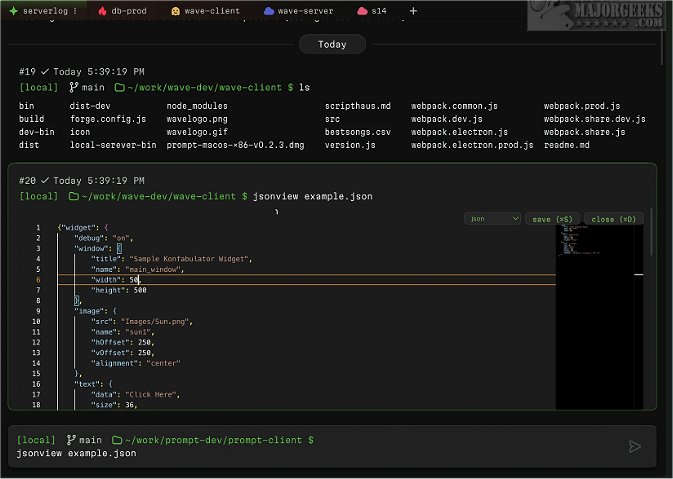
One of Wave's standout features is its inline renderers, which enable the visualization of code, images, markdown, and CSV files directly within the terminal. This functionality significantly reduces the need for context switching between applications. Additionally, Wave Terminal supports persistent sessions, allowing users to maintain their state even during network disconnections or system reboots.
The terminal also boasts a searchable contextual command history feature that operates across all remote sessions while being stored locally. Users can keep their work organized using workspaces, tabs, and command blocks. For instance, developers can create separate workspaces for different environments, such as development, testing, and production servers.
Editing files is intuitive in Wave Terminal, as users can modify files inline on both local and remote systems without the need for extensive keyboard shortcuts, enabling them to use it like a standard text editor. Importantly, all user data, including command history, environment information, and output, is securely stored locally in the ~/.waveterm directory, ensuring privacy and data security.
For those who are new to Wave Terminal, there is a dedicated help section to assist in getting started.
In conclusion, Wave Terminal is not just an evolution of terminal emulators but a reimagining of how users interact with command-line environments. Its user-friendly features and emphasis on security and customization make it an appealing choice for developers at all skill levels. As the software continues to evolve, users can expect even more enhancements that will further simplify and enrich their terminal experience
What sets Wave Terminal apart is its comprehensive redesign focused on usability for both seasoned command-line interface (CLI) users and newcomers to software development. As an open-source project, it is free to use and customizable, allowing users to tailor it to their specific needs.
One of Wave's standout features is its inline renderers, which enable the visualization of code, images, markdown, and CSV files directly within the terminal. This functionality significantly reduces the need for context switching between applications. Additionally, Wave Terminal supports persistent sessions, allowing users to maintain their state even during network disconnections or system reboots.
The terminal also boasts a searchable contextual command history feature that operates across all remote sessions while being stored locally. Users can keep their work organized using workspaces, tabs, and command blocks. For instance, developers can create separate workspaces for different environments, such as development, testing, and production servers.
Editing files is intuitive in Wave Terminal, as users can modify files inline on both local and remote systems without the need for extensive keyboard shortcuts, enabling them to use it like a standard text editor. Importantly, all user data, including command history, environment information, and output, is securely stored locally in the ~/.waveterm directory, ensuring privacy and data security.
For those who are new to Wave Terminal, there is a dedicated help section to assist in getting started.
In conclusion, Wave Terminal is not just an evolution of terminal emulators but a reimagining of how users interact with command-line environments. Its user-friendly features and emphasis on security and customization make it an appealing choice for developers at all skill levels. As the software continues to evolve, users can expect even more enhancements that will further simplify and enrich their terminal experience
Wave Terminal 0.14.0 Beta 2 / 0.13.1 released
Wave Terminal is a versatile, cross-platform Linux terminal that can be used for streamlining workflows.