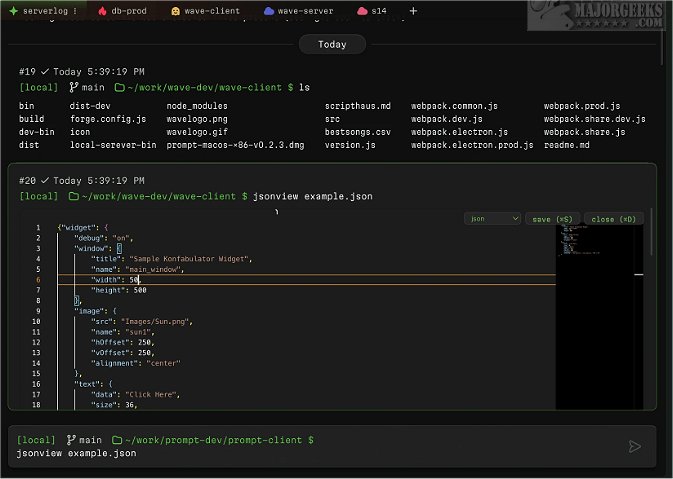
Wave Terminal has recently released its versions 0.13.0 Beta 3 and 0.12.5, continuing to establish itself as a powerful, cross-platform terminal solution for Linux users. Designed to enhance productivity, Wave Terminal caters especially to those who may find traditional command-line interfaces intimidating. It represents a significant evolution in terminal design by merging the capabilities of the open web with a user-friendly approach suitable for both seasoned CLI users and newcomers alike.
Being open-source, Wave Terminal is available at no cost and allows for customization to meet individual preferences. One of its standout features is the inline renderers that facilitate rendering of code, images, markdown, and CSV files directly within the terminal, reducing the need to switch contexts. Furthermore, the terminal supports persistent sessions, enabling users to maintain their workflow even after network interruptions or system reboots.
The application boasts a searchable command history feature that is accessible across all remote sessions and is saved locally, enhancing efficiency. Users can also take advantage of organizational tools such as workspaces, tabs, and command blocks. This is particularly useful for managing multiple terminal sessions related to different environments (development, testing, production) within a single project.
Editing capabilities are simplified in Wave Terminal, allowing users to modify files inline without the necessity of learning complex keyboard shortcuts, thereby functioning similarly to a conventional text editor. All user data—including command history, environment settings, output, and metadata—is securely stored on the local machine in the ~/.waveterm directory, ensuring privacy and security.
For those new to Wave Terminal, a dedicated help section is available to assist users in getting started and exploring its features.
In summary, Wave Terminal not only enhances the terminal experience for Linux users but also promotes a more intuitive and organized approach to command-line tasks, making it an excellent tool for developers and tech enthusiasts alike. With its ongoing updates and features, Wave Terminal is poised to become an essential part of many users' workflows. Future developments could include enhanced collaboration tools for remote teams and integration with cloud services to further streamline the development process
Being open-source, Wave Terminal is available at no cost and allows for customization to meet individual preferences. One of its standout features is the inline renderers that facilitate rendering of code, images, markdown, and CSV files directly within the terminal, reducing the need to switch contexts. Furthermore, the terminal supports persistent sessions, enabling users to maintain their workflow even after network interruptions or system reboots.
The application boasts a searchable command history feature that is accessible across all remote sessions and is saved locally, enhancing efficiency. Users can also take advantage of organizational tools such as workspaces, tabs, and command blocks. This is particularly useful for managing multiple terminal sessions related to different environments (development, testing, production) within a single project.
Editing capabilities are simplified in Wave Terminal, allowing users to modify files inline without the necessity of learning complex keyboard shortcuts, thereby functioning similarly to a conventional text editor. All user data—including command history, environment settings, output, and metadata—is securely stored on the local machine in the ~/.waveterm directory, ensuring privacy and security.
For those new to Wave Terminal, a dedicated help section is available to assist users in getting started and exploring its features.
In summary, Wave Terminal not only enhances the terminal experience for Linux users but also promotes a more intuitive and organized approach to command-line tasks, making it an excellent tool for developers and tech enthusiasts alike. With its ongoing updates and features, Wave Terminal is poised to become an essential part of many users' workflows. Future developments could include enhanced collaboration tools for remote teams and integration with cloud services to further streamline the development process
Wave Terminal 0.13.0 Beta 3 / 0.12.5 released
Wave Terminal is a versatile, cross-platform Linux terminal that can be used for streamlining workflows.