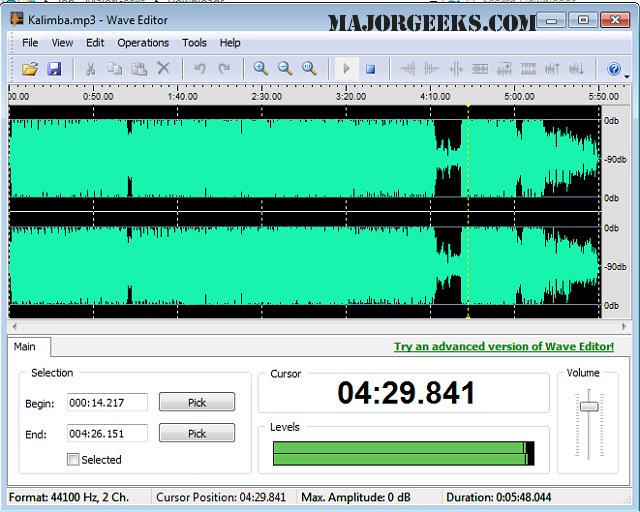
Wave Editor 5.0.0.0 has been released, offering users a user-friendly digital audio editing tool that supports a wide range of audio formats and functions. This software is designed to cater to beginners who wish to perform straightforward editing tasks such as copying, pasting, cutting, and deleting segments of audio recordings. Unlike many similar applications, Wave Editor is built from scratch using the ActiveX engine, featuring a sleek interface that prioritizes speed and ease of use.
One of the standout features of Wave Editor is its ability to allow users to select audio blocks while the playback is ongoing. Additionally, it offers a non-destructive editing capability, which means users can make temporary changes to an audio track without altering the original file—ideal for experimenting with edits before finalizing them.
Supported formats include MP3, WMA, and various WAV types (such as PCM, ADPCM, GSM61, DSP, A-LAW, U-LAW), with options for 8-bit and 16-bit samples, mono or stereo channels, and sample rates ranging from 8000 Hz to 96000 Hz. The maximum audio file size is capped at 2 Gigabytes.
Wave Editor also provides a comprehensive set of editing operations, including:
- Cut, Copy, Paste, Delete
- Insert Silence
- Normalize
- Amplify with Peak Limiter
- Fade In and Fade Out
- Save Selected Fragment
- Reverse/Invert
- Unlimited Undo/Redo
- Play, Pause, Stop
- Zoom In/Out
- Export to WAV and MP3 formats
In addition to its editing capabilities, Wave Editor is accompanied by relevant resources for users looking to enhance their audio experience on Windows. These include guides on enabling Windows Sonic Surround Sound, changing default sound output devices, managing sound input/output device names, adjusting volume, troubleshooting audio issues, and addressing sound delays or lags.
As audio editing continues to gain importance in various fields—from music production to podcasting—Wave Editor 5.0.0.0 positions itself as an accessible choice for users seeking efficient and effective solutions for their audio editing needs. With its ongoing updates and user-centric features, it stands out as a valuable tool for both novices and experienced editors alike
One of the standout features of Wave Editor is its ability to allow users to select audio blocks while the playback is ongoing. Additionally, it offers a non-destructive editing capability, which means users can make temporary changes to an audio track without altering the original file—ideal for experimenting with edits before finalizing them.
Supported formats include MP3, WMA, and various WAV types (such as PCM, ADPCM, GSM61, DSP, A-LAW, U-LAW), with options for 8-bit and 16-bit samples, mono or stereo channels, and sample rates ranging from 8000 Hz to 96000 Hz. The maximum audio file size is capped at 2 Gigabytes.
Wave Editor also provides a comprehensive set of editing operations, including:
- Cut, Copy, Paste, Delete
- Insert Silence
- Normalize
- Amplify with Peak Limiter
- Fade In and Fade Out
- Save Selected Fragment
- Reverse/Invert
- Unlimited Undo/Redo
- Play, Pause, Stop
- Zoom In/Out
- Export to WAV and MP3 formats
In addition to its editing capabilities, Wave Editor is accompanied by relevant resources for users looking to enhance their audio experience on Windows. These include guides on enabling Windows Sonic Surround Sound, changing default sound output devices, managing sound input/output device names, adjusting volume, troubleshooting audio issues, and addressing sound delays or lags.
As audio editing continues to gain importance in various fields—from music production to podcasting—Wave Editor 5.0.0.0 positions itself as an accessible choice for users seeking efficient and effective solutions for their audio editing needs. With its ongoing updates and user-centric features, it stands out as a valuable tool for both novices and experienced editors alike
Wave Editor 5.0.0.0 released
Wave Editor is an easy-to-use digital audio editing tool with many supported formats, and operations.