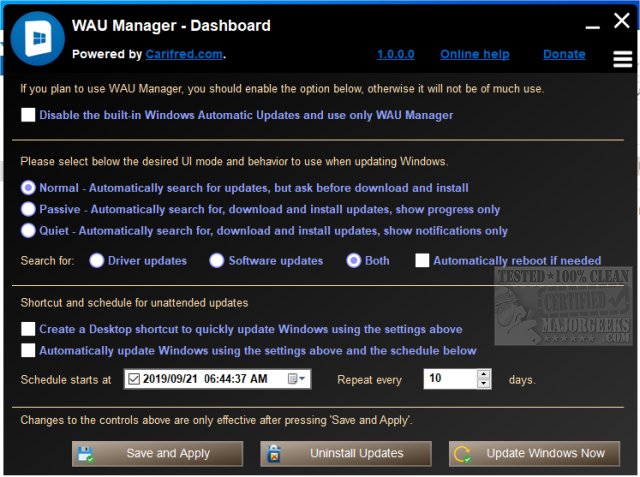
WAU Manager 3.8.6.0 has been released as a free, portable alternative to the standard Windows Update interface. This tool gives users extensive control over Windows Updates, allowing them to determine when and how updates are applied. Users can choose to update manually via a desktop shortcut or set up automatic updates based on their preferred schedule, whether daily, monthly, or yearly.
The application features a user-friendly Dashboard where users can make various update decisions, including whether to automatically download and install available updates. To enhance its functionality, WAU Manager operates independently of the built-in Windows Update schedule, and users are advised to disable the default Windows Update to ensure optimal performance of WAU Manager.
In addition to the Dashboard, WAU Manager consists of four additional modules:
1. Install Updates Module: Searches for and installs selected updates, with the option to hide certain updates from being displayed.
2. Uninstall Updates Module: Allows users to uninstall or hide updates that have already been installed.
3. Unhide Updates Module: Lets users view and unhide previously hidden updates.
4. View Update History Module: Displays the history of Windows updates and provides options for maintenance related to updates.
Overall, WAU Manager is a powerful tool for users who want a more personalized and flexible approach to managing Windows Updates.
Extension: As technology continues to evolve, the need for better control over system updates is becoming increasingly important. WAU Manager not only fills this gap but also empowers users to optimize their system performance by managing updates on their own terms. Future updates to WAU Manager could potentially introduce more advanced features, such as integration with other system maintenance tools, enhanced security options for update downloads, and even user-defined rules for updates based on system usage patterns. This could further enhance user experience and provide a comprehensive solution for maintaining system reliability and performance
The application features a user-friendly Dashboard where users can make various update decisions, including whether to automatically download and install available updates. To enhance its functionality, WAU Manager operates independently of the built-in Windows Update schedule, and users are advised to disable the default Windows Update to ensure optimal performance of WAU Manager.
In addition to the Dashboard, WAU Manager consists of four additional modules:
1. Install Updates Module: Searches for and installs selected updates, with the option to hide certain updates from being displayed.
2. Uninstall Updates Module: Allows users to uninstall or hide updates that have already been installed.
3. Unhide Updates Module: Lets users view and unhide previously hidden updates.
4. View Update History Module: Displays the history of Windows updates and provides options for maintenance related to updates.
Overall, WAU Manager is a powerful tool for users who want a more personalized and flexible approach to managing Windows Updates.
Extension: As technology continues to evolve, the need for better control over system updates is becoming increasingly important. WAU Manager not only fills this gap but also empowers users to optimize their system performance by managing updates on their own terms. Future updates to WAU Manager could potentially introduce more advanced features, such as integration with other system maintenance tools, enhanced security options for update downloads, and even user-defined rules for updates based on system usage patterns. This could further enhance user experience and provide a comprehensive solution for maintaining system reliability and performance
WAU Manager 3.8.6.0 released
WAU Manager (Windows Automatic Updates Manager) is a free portable replacement for the default Windows Updating interface.