VOVSOFT has released version 5.3 of its free application, Prevent Disk Sleep, which is specifically designed to prevent USB, primary, and secondary hard disk drives from entering sleep mode. Hard disks typically enter sleep mode during inactivity to promote longevity and reduce heat, but this can lead to delays in file operations. The Prevent Disk Sleep app allows users to bypass sleep mode, ensuring quick access and responsiveness, even after extended periods of inactivity.
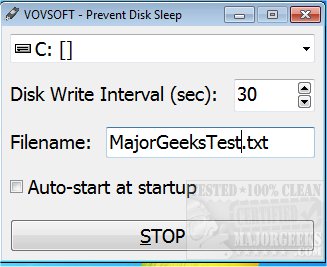
The app simplifies the process of keeping disks awake by allowing users to create a schedule in a plain text document for either internal or external drives. It features a user-friendly interface that facilitates quick setup: users can select their desired disk from a drop-down menu, specify the interval for disk activity, rename the text file for easy identification, and simply click 'Start' to activate the prevention of sleep mode.
For those seeking a straightforward solution to manage their disk settings without needing to adjust system configurations manually, VOVSOFT Prevent Disk Sleep offers an efficient alternative.
Additionally, users may find related resources useful for optimizing their power settings, such as guides on enabling the Ultimate Performance Power Plan in Windows 10, understanding the differences between sleep, hibernate, and shutdown modes, and restoring or deleting Windows power plans. These resources can help enhance overall system performance and efficiency
The app simplifies the process of keeping disks awake by allowing users to create a schedule in a plain text document for either internal or external drives. It features a user-friendly interface that facilitates quick setup: users can select their desired disk from a drop-down menu, specify the interval for disk activity, rename the text file for easy identification, and simply click 'Start' to activate the prevention of sleep mode.
For those seeking a straightforward solution to manage their disk settings without needing to adjust system configurations manually, VOVSOFT Prevent Disk Sleep offers an efficient alternative.
Additionally, users may find related resources useful for optimizing their power settings, such as guides on enabling the Ultimate Performance Power Plan in Windows 10, understanding the differences between sleep, hibernate, and shutdown modes, and restoring or deleting Windows power plans. These resources can help enhance overall system performance and efficiency
VOVSOFT Prevent Disk Sleep 5.3 released
VOVSOFT Prevent Disk Sleep is a free app designed to block your USB, primary, and secondary hard disk drive from going into sleep mode.