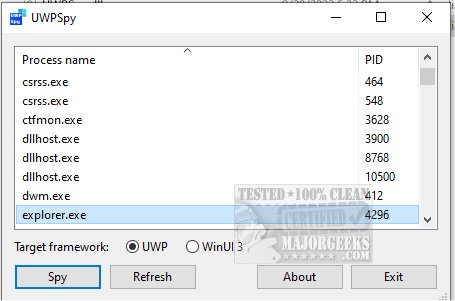
UWPSpy version 1.5.3 has been released, providing developers with a powerful tool for inspecting and manipulating Universal Windows Platform (UWP) applications. Developed by the creator of Textify and 7+ Taskbar Tweaker, UWPSpy is designed to enhance the workflow of UWP app developers by offering practical features that allow for real-time monitoring and modification of app elements.
With UWPSpy, developers can reposition user interface (UI) components and make various adjustments to their applications. While some technical knowledge is required to effectively utilize these features, the tool simplifies the manipulation process, making it accessible and efficient. One of its standout features is the ability to observe changes in real time, which is particularly useful for UI design tasks. As developers modify specific properties, related elements are highlighted, and updates are reflected instantly within the application.
To use UWPSpy, follow these steps:
1. Launch UWPSpy.exe and choose the UWP/WinUI 3 application you wish to inspect.
2. A window will display the UI elements of the selected application for each UI thread.
3. You can close the UWPSpy window, and it will remain hidden until you reopen it by running UWPSpy.exe again and selecting the same application.
4. To cease monitoring an application, you must terminate its process.
It's advisable to create a restore point before making any changes to ensure that you can revert to a previous state if needed.
In summary, UWPSpy 1.5.3 is an essential tool for UWP app developers, providing real-time insights and modification capabilities that streamline the development process. As the demand for UWP applications continues to grow, tools like UWPSpy will play a crucial role in enhancing productivity and facilitating effective app design and functionality
With UWPSpy, developers can reposition user interface (UI) components and make various adjustments to their applications. While some technical knowledge is required to effectively utilize these features, the tool simplifies the manipulation process, making it accessible and efficient. One of its standout features is the ability to observe changes in real time, which is particularly useful for UI design tasks. As developers modify specific properties, related elements are highlighted, and updates are reflected instantly within the application.
To use UWPSpy, follow these steps:
1. Launch UWPSpy.exe and choose the UWP/WinUI 3 application you wish to inspect.
2. A window will display the UI elements of the selected application for each UI thread.
3. You can close the UWPSpy window, and it will remain hidden until you reopen it by running UWPSpy.exe again and selecting the same application.
4. To cease monitoring an application, you must terminate its process.
It's advisable to create a restore point before making any changes to ensure that you can revert to a previous state if needed.
In summary, UWPSpy 1.5.3 is an essential tool for UWP app developers, providing real-time insights and modification capabilities that streamline the development process. As the demand for UWP applications continues to grow, tools like UWPSpy will play a crucial role in enhancing productivity and facilitating effective app design and functionality
UWPSpy 1.5.3 released
UWPSpy (brought to you by the developer of Textify and 7+ Taskbar Tweaker) provides a way to inspect and manipulate UWP-based apps.