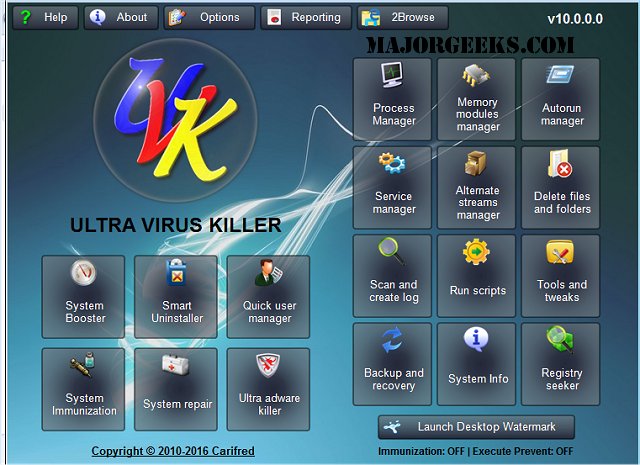
UVK Ultra Virus Killer 11.10.20.0 has been released, offering users a robust tool for detecting and removing all types of malware and spyware from infected systems. With its user-friendly interface, UVK simplifies the process of malware management. For those seeking additional scanning and live protection capabilities, Malwarebytes is recommended as a complementary option.
Key Features of UVK Ultra Virus Killer:
1. Process Management:
- Filter and manage running processes, including the ability to kill multiple processes simultaneously.
- Pause, resume, and verify process signatures, along with internet searches for additional information.
- Integration with VirusTotal to check process file safety.
2. Startup Entries and Scheduled Tasks:
- Delete startup entries, scheduled tasks, and related files in bulk.
- Verify file signatures and access registry keys associated with startup items.
- Option to hide Microsoft signed files for a clearer view of potential threats.
3. Windows Services and Drivers:
- Manage services and drivers effectively, with options to stop, start, and configure them.
- Verify and search for service/driver file details online, and submit to VirusTotal for safety checks.
4. File and Folder Management:
- Delete files/folders that are typically in use, providing flexibility in file management.
- Options to either delete permanently or move to the recycle bin.
5. Scanning and Logging:
- Conduct comprehensive system scans and save logs for further analysis or sharing.
- Customizable log options to include or exclude specific file types and signatures.
6. UVK Scripts:
- Utilize scripts for system repairs, including registry modifications and file deletions.
- Create restore points and automate maintenance tasks.
7. Information Retrieval:
- Access detailed information about files and system status, beneficial for diagnostics and performance assessment.
- Generate reports and export data for further use.
8. Immunization:
- Prevent vulnerabilities in the system by protecting critical registry and file system areas from infections.
9. System Repair:
- Over fifty exclusive fixes available to address common Windows issues, enhancing system stability and performance.
10. System Information:
- Display essential system details, including hardware specs and software licenses, with export options for documentation.
In conclusion, UVK Ultra Virus Killer stands out as a comprehensive solution for users looking to combat malware and maintain system health. Its extensive features cater to a wide range of malware management and system repair needs, making it a valuable addition to any user's toolkit. For those concerned about ongoing security, it's advisable to complement UVK with other antivirus solutions to ensure full protection against evolving threats
Key Features of UVK Ultra Virus Killer:
1. Process Management:
- Filter and manage running processes, including the ability to kill multiple processes simultaneously.
- Pause, resume, and verify process signatures, along with internet searches for additional information.
- Integration with VirusTotal to check process file safety.
2. Startup Entries and Scheduled Tasks:
- Delete startup entries, scheduled tasks, and related files in bulk.
- Verify file signatures and access registry keys associated with startup items.
- Option to hide Microsoft signed files for a clearer view of potential threats.
3. Windows Services and Drivers:
- Manage services and drivers effectively, with options to stop, start, and configure them.
- Verify and search for service/driver file details online, and submit to VirusTotal for safety checks.
4. File and Folder Management:
- Delete files/folders that are typically in use, providing flexibility in file management.
- Options to either delete permanently or move to the recycle bin.
5. Scanning and Logging:
- Conduct comprehensive system scans and save logs for further analysis or sharing.
- Customizable log options to include or exclude specific file types and signatures.
6. UVK Scripts:
- Utilize scripts for system repairs, including registry modifications and file deletions.
- Create restore points and automate maintenance tasks.
7. Information Retrieval:
- Access detailed information about files and system status, beneficial for diagnostics and performance assessment.
- Generate reports and export data for further use.
8. Immunization:
- Prevent vulnerabilities in the system by protecting critical registry and file system areas from infections.
9. System Repair:
- Over fifty exclusive fixes available to address common Windows issues, enhancing system stability and performance.
10. System Information:
- Display essential system details, including hardware specs and software licenses, with export options for documentation.
In conclusion, UVK Ultra Virus Killer stands out as a comprehensive solution for users looking to combat malware and maintain system health. Its extensive features cater to a wide range of malware management and system repair needs, making it a valuable addition to any user's toolkit. For those concerned about ongoing security, it's advisable to complement UVK with other antivirus solutions to ensure full protection against evolving threats
UVK Ultra Virus Killer 11.10.20.0 released
UVK Ultra Virus Killer allows users to detect and delete all types of malware and spyware from infected systems.