uView Player Lite version 8.7.3.0 has been released, providing users with the capability to watch videos in a picture-in-picture mode while multitasking, whether for work or gaming. Upon installation, the application monitors the clipboard and can automatically play videos, although some users have encountered errors with this feature. An alternative method to play videos is by copying the website address directly into the player.
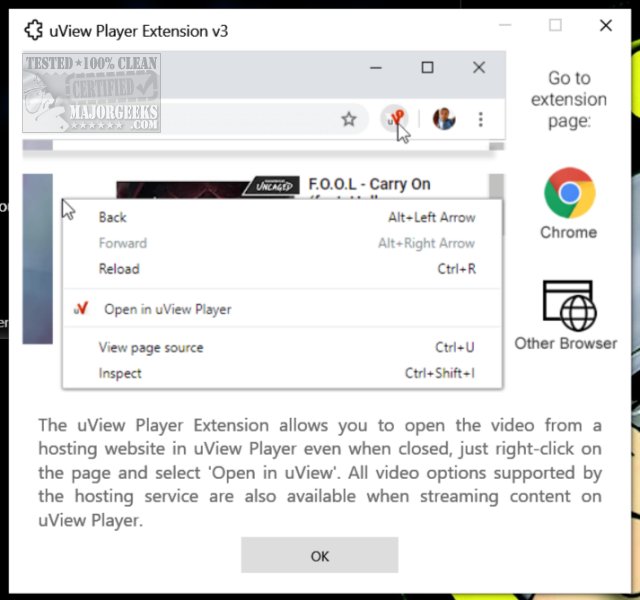
While the application promises a convenient way to manage video playback, users have reported difficulties locating the "Open in uView" option when right-clicking on web pages. The app does offer various functionalities, including options to lock, save, and toggle pan mode. However, it is worth mentioning that YouTube, the leading video streaming platform, already has a similar picture-in-picture feature, which limits the uniqueness of uView Player Lite. Despite this, uView offers additional features like moving, locking, and panning, which may not be available on YouTube.
As uView Player Lite is designed for Windows, users of Linux and Mac systems can only access similar functionalities through the Chrome or Firefox versions in their browsers.
In summary, uView Player Lite is a versatile tool for video playback across multiple platforms, but its effectiveness may be overshadowed by existing features on more popular streaming services. Users may want to explore browser-based alternatives or consider the app's unique features to enhance their viewing experience.
Additionally, it's important for users to be aware of complementary guides like how to delete YouTube watch history, enable HDR settings in Windows, or utilize the Microsoft Photo app for video editing, which can further enhance their multimedia experience
While the application promises a convenient way to manage video playback, users have reported difficulties locating the "Open in uView" option when right-clicking on web pages. The app does offer various functionalities, including options to lock, save, and toggle pan mode. However, it is worth mentioning that YouTube, the leading video streaming platform, already has a similar picture-in-picture feature, which limits the uniqueness of uView Player Lite. Despite this, uView offers additional features like moving, locking, and panning, which may not be available on YouTube.
As uView Player Lite is designed for Windows, users of Linux and Mac systems can only access similar functionalities through the Chrome or Firefox versions in their browsers.
In summary, uView Player Lite is a versatile tool for video playback across multiple platforms, but its effectiveness may be overshadowed by existing features on more popular streaming services. Users may want to explore browser-based alternatives or consider the app's unique features to enhance their viewing experience.
Additionally, it's important for users to be aware of complementary guides like how to delete YouTube watch history, enable HDR settings in Windows, or utilize the Microsoft Photo app for video editing, which can further enhance their multimedia experience
uView Player Lite 8.7.3.0 released
uView Player Lite allows you to play videos in picture-to-picture mode while working and playing games.