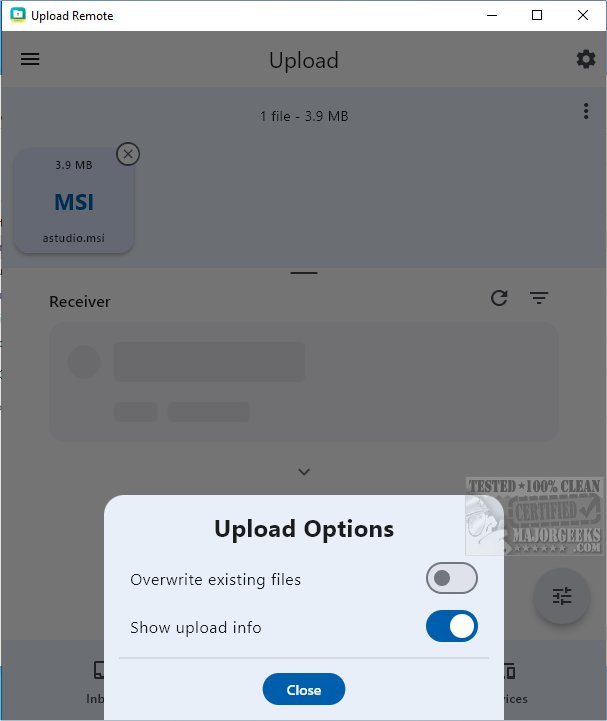
Upload Remote is a powerful file-sharing application designed to enable secure and efficient transfers across multiple devices, including computers, smartphones, and tablets. As a cross-platform solution, it allows users to quickly exchange files over local networks or Wi-Fi, prioritizing security through end-to-end encryption. This means that all data remains solely on the users' devices, with no information transmitted to external servers, ensuring privacy and control over shared content.
Key Features of Upload Remote
1. Streamlined File-Sharing: Upload Remote enhances the file-sharing experience by allowing senders to directly push files into the receiver's Inbox folder without requiring confirmation from the recipient. This feature saves time and minimizes unnecessary interactions, resulting in a more efficient workflow.
2. User-Friendly Interface: The application boasts a compact design featuring three main tabs:
- Inbox Tab: Displays incoming files, with new additions highlighted at the top, reminiscent of email apps. Users can manage files by opening, saving, sharing, or deleting them.
- Upload Tab: Facilitates file selection for sending, with nearby devices listed for convenience. Users need only tap on a device to initiate the upload.
- Devices Tab: Allows for easy management of paired devices, enabling users to reorder, rename, or remove devices as necessary.
3. Upload Notifications: New files uploaded will appear with an "unread" indicator, ensuring that they are easily identifiable. Additionally, if a sender attempts to upload files with names already existing in the Inbox, a confirmation dialog will appear to prevent accidental overwriting.
4. Permission Settings: While primarily designed for personal devices, Upload Remote allows users to grant upload permissions to others. To enhance security, users can set up passwords, protecting their devices from unauthorized access while still enabling designated individuals to share content.
Geek Verdict: Upload Remote stands out as an intuitive and efficient solution for file transferring, catering to users of all technical levels. Whether sharing documents, photos, or videos, its user-friendly interface makes it accessible and easy to use.
Future Enhancements: Moving forward, Upload Remote could benefit from additional features such as cloud integration for backup options, enhanced multi-device compatibility, and advanced file organization tools to further streamline the user experience. Additionally, incorporating AI-driven features for file sorting and intelligent suggestions could enhance usability, making file sharing even more intuitive.
In conclusion, Upload Remote 1.0.9 is not only a tool for file sharing but also a secure and user-centric platform that prioritizes a seamless experience while maintaining the highest standards of privacy and control
Key Features of Upload Remote
1. Streamlined File-Sharing: Upload Remote enhances the file-sharing experience by allowing senders to directly push files into the receiver's Inbox folder without requiring confirmation from the recipient. This feature saves time and minimizes unnecessary interactions, resulting in a more efficient workflow.
2. User-Friendly Interface: The application boasts a compact design featuring three main tabs:
- Inbox Tab: Displays incoming files, with new additions highlighted at the top, reminiscent of email apps. Users can manage files by opening, saving, sharing, or deleting them.
- Upload Tab: Facilitates file selection for sending, with nearby devices listed for convenience. Users need only tap on a device to initiate the upload.
- Devices Tab: Allows for easy management of paired devices, enabling users to reorder, rename, or remove devices as necessary.
3. Upload Notifications: New files uploaded will appear with an "unread" indicator, ensuring that they are easily identifiable. Additionally, if a sender attempts to upload files with names already existing in the Inbox, a confirmation dialog will appear to prevent accidental overwriting.
4. Permission Settings: While primarily designed for personal devices, Upload Remote allows users to grant upload permissions to others. To enhance security, users can set up passwords, protecting their devices from unauthorized access while still enabling designated individuals to share content.
Geek Verdict: Upload Remote stands out as an intuitive and efficient solution for file transferring, catering to users of all technical levels. Whether sharing documents, photos, or videos, its user-friendly interface makes it accessible and easy to use.
Future Enhancements: Moving forward, Upload Remote could benefit from additional features such as cloud integration for backup options, enhanced multi-device compatibility, and advanced file organization tools to further streamline the user experience. Additionally, incorporating AI-driven features for file sorting and intelligent suggestions could enhance usability, making file sharing even more intuitive.
In conclusion, Upload Remote 1.0.9 is not only a tool for file sharing but also a secure and user-centric platform that prioritizes a seamless experience while maintaining the highest standards of privacy and control
Upload Remote 1.0.9 released
Upload Remote is a versatile file-sharing application that facilitates seamless and secure transfers across various devices, including computers, phones, and tablets.