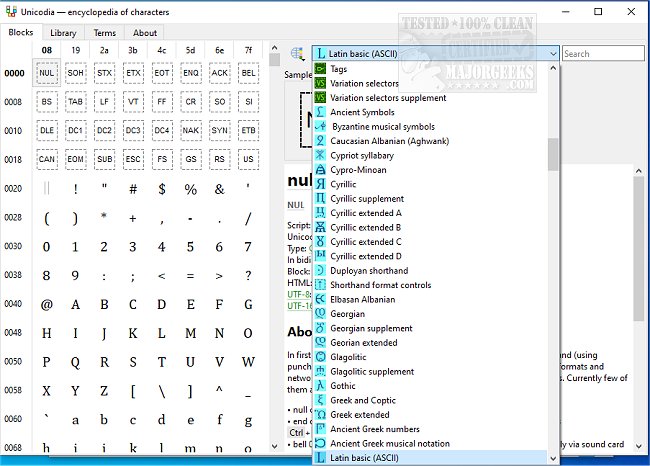
Unicodia 3.0.8 has been released, offering an enhanced open-source encyclopedia of Unicode characters. This tool serves as a versatile character map for Windows systems, allowing users to easily navigate and copy a wide range of ASCII symbols to their clipboard. Notably, Unicodia is portable, enabling it to be used directly from a USB drive, making it convenient for users who require access to Unicode characters on various machines.
The latest version supports all characters from Unicode 15 on Windows 10 and 11, while Windows 7 users have access to characters from the Base Multilingual Plane, as well as significant scripts like Phoenician, Aramaic, Brahmi, and Old Gothic. Unicodia also indicates whether a character is supported on the user's system and identifies the corresponding font.
Users can copy character codes in multiple formats, including HTML, UTF-8, and UTF-16, making it a flexible resource for developers and content creators. The interface features a simple search function to enhance usability. To install Unicodia, users will need 7-zip or a similar tool to unpack the 7z archive, although a zero-dependency portable version is also available in PortableApps format. An installer can be downloaded from MajorGeeks.
In addition to its primary features, Unicodia can serve users looking to manage fonts on their Windows systems. It provides guidance on how to install or uninstall fonts, restore default font settings, acquire more fonts in Windows 10 and 11, and adjust text sizes for title bars.
As Unicode continues to evolve, tools like Unicodia remain essential for users who need to work with a diverse array of characters and symbols, further enhancing their productivity and creativity in digital content creation
The latest version supports all characters from Unicode 15 on Windows 10 and 11, while Windows 7 users have access to characters from the Base Multilingual Plane, as well as significant scripts like Phoenician, Aramaic, Brahmi, and Old Gothic. Unicodia also indicates whether a character is supported on the user's system and identifies the corresponding font.
Users can copy character codes in multiple formats, including HTML, UTF-8, and UTF-16, making it a flexible resource for developers and content creators. The interface features a simple search function to enhance usability. To install Unicodia, users will need 7-zip or a similar tool to unpack the 7z archive, although a zero-dependency portable version is also available in PortableApps format. An installer can be downloaded from MajorGeeks.
In addition to its primary features, Unicodia can serve users looking to manage fonts on their Windows systems. It provides guidance on how to install or uninstall fonts, restore default font settings, acquire more fonts in Windows 10 and 11, and adjust text sizes for title bars.
As Unicode continues to evolve, tools like Unicodia remain essential for users who need to work with a diverse array of characters and symbols, further enhancing their productivity and creativity in digital content creation
Unicodia 3.0.8 released
Unicodia is an Open Source encyclopedia of Unicode characters.