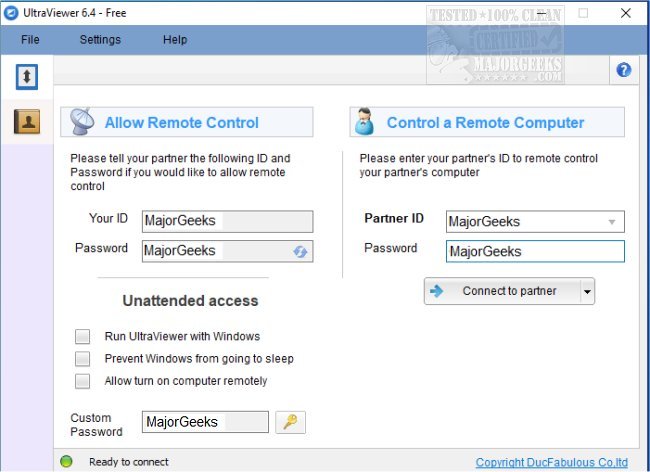
UltraViewer 6.6.127 has been released, enhancing its functionality as a remote PC connection tool that allows users to provide support from anywhere. This application is designed for easy access to and from machines, facilitating assistance for family members or clients from the comfort of one's office. Users can connect through a secure ID and password, reminiscent of other remote access products.
One of the standout features of UltraViewer is its integrated chat window, which enables real-time communication with the user being assisted, ensuring immediate feedback and guidance. Users can toggle the chat feature on or off with a default hotkey (F1) or a custom key, allowing for better workflow management. The software also supports simultaneous computer control and screen sharing with multiple users, making collaboration seamless.
Security is a paramount feature of UltraViewer, particularly for business clients handling sensitive data. The application guarantees secure connections, giving users confidence when providing support. Users can customize connection settings via the Options window to meet their specific requirements.
UltraViewer's user-friendly design simplifies the installation process, making it accessible to individuals with minimal technical knowledge. This ease of use is advantageous for professionals who need to provide technical support regularly, allowing them to focus on client assistance rather than navigating complex software.
Overall, UltraViewer is crafted for quick installation and smooth operation, catering to users of all skill levels. Its intuitive interface ensures that both beginners and seasoned professionals can easily access its robust features, solidifying its status as an essential tool for remote support tasks.
To extend the discussion, UltraViewer could also explore additional features such as enhanced file transfer capabilities, integration with project management tools, and improved multi-user management for larger teams. Furthermore, expanding its compatibility with various operating systems and devices could increase its usability across different platforms, making it an even more versatile solution for remote support. Incorporating user feedback for future updates could also foster a community-driven approach to software development, ensuring that UltraViewer continues to meet evolving user needs effectively
One of the standout features of UltraViewer is its integrated chat window, which enables real-time communication with the user being assisted, ensuring immediate feedback and guidance. Users can toggle the chat feature on or off with a default hotkey (F1) or a custom key, allowing for better workflow management. The software also supports simultaneous computer control and screen sharing with multiple users, making collaboration seamless.
Security is a paramount feature of UltraViewer, particularly for business clients handling sensitive data. The application guarantees secure connections, giving users confidence when providing support. Users can customize connection settings via the Options window to meet their specific requirements.
UltraViewer's user-friendly design simplifies the installation process, making it accessible to individuals with minimal technical knowledge. This ease of use is advantageous for professionals who need to provide technical support regularly, allowing them to focus on client assistance rather than navigating complex software.
Overall, UltraViewer is crafted for quick installation and smooth operation, catering to users of all skill levels. Its intuitive interface ensures that both beginners and seasoned professionals can easily access its robust features, solidifying its status as an essential tool for remote support tasks.
To extend the discussion, UltraViewer could also explore additional features such as enhanced file transfer capabilities, integration with project management tools, and improved multi-user management for larger teams. Furthermore, expanding its compatibility with various operating systems and devices could increase its usability across different platforms, making it an even more versatile solution for remote support. Incorporating user feedback for future updates could also foster a community-driven approach to software development, ensuring that UltraViewer continues to meet evolving user needs effectively
UltraViewer 6.6.127 released
UltraViewer allows remote PC connection for support to and from your machine.