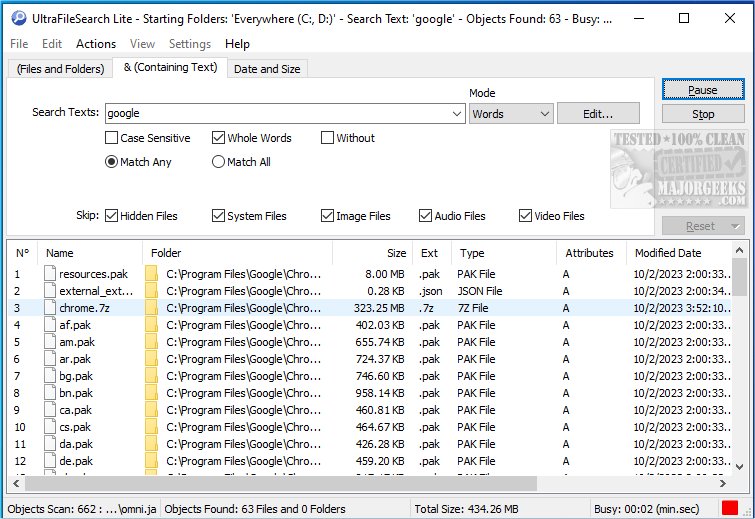
UltraFileSearch has released version 7.6.0.25357, enhancing its powerful file search utility that efficiently locates files, folders, and specific text across various storage mediums, including local hard drives, network locations, and removable devices like USB drives. This software allows users to search multiple file names and specify several drives or folders at once, streamlining the file retrieval process.
One of the key features of UltraFileSearch is its advanced sorting capability, where users can organize search results based on properties such as modified date, size, and type. This assists in quickly narrowing down results to find the desired files or folders. Additionally, the program excels in searching for files that contain specific words or phrases, enabling precise searches for documents or information.
The user interface is designed for ease of navigation and resembles familiar Windows Explorer functionality. Users can sort their search results by simply clicking on column headers and access additional options through context menus. The results window also supports intuitive actions, such as opening or revealing the containing folder of a selected file, enhancing the usability of the application.
Moreover, UltraFileSearch offers the capability to export search results in multiple formats, including .TXT, .CSV, .TSV, .HTML, and .XML, facilitating easy sharing or further manipulation of data. Notably, the software operates without the need for background indexing, which preserves system performance and speeds up searches.
Key features of UltraFileSearch include:
- Multiple search modes for file names, including Simple, Similarity, Wildcards, and Wildcard Expressions.
- The ability to create multi-folder lists to include or exclude specific drives and folders from searches.
- Search capabilities for specific words or phrases within plain text files or encoded documents using IFilters or Text Filters.
- Filtering options for search results based on date, size, attributes, folder and filename length, path depth level, and file owner.
- File management operations such as cutting, copying, moving, deleting, and renaming files.
- Batch renaming features to modify filenames by removing or replacing characters, changing case, or inserting sequences and text.
- An export feature that allows users to customize which columns to export, the destination, file format, and encoding.
- A mirror copy function to replicate folder structures and files.
- Tools for calculating file hash values and identifying duplicate files.
Overall, UltraFileSearch is a comprehensive tool for efficient file management, catering to both casual users and professionals who require a reliable solution for locating and organizing files swiftly and effectively.
In future updates, users might anticipate even more enhancements, such as improved integration with cloud storage services, advanced AI-driven search capabilities, and deeper customization options for file management workflows
One of the key features of UltraFileSearch is its advanced sorting capability, where users can organize search results based on properties such as modified date, size, and type. This assists in quickly narrowing down results to find the desired files or folders. Additionally, the program excels in searching for files that contain specific words or phrases, enabling precise searches for documents or information.
The user interface is designed for ease of navigation and resembles familiar Windows Explorer functionality. Users can sort their search results by simply clicking on column headers and access additional options through context menus. The results window also supports intuitive actions, such as opening or revealing the containing folder of a selected file, enhancing the usability of the application.
Moreover, UltraFileSearch offers the capability to export search results in multiple formats, including .TXT, .CSV, .TSV, .HTML, and .XML, facilitating easy sharing or further manipulation of data. Notably, the software operates without the need for background indexing, which preserves system performance and speeds up searches.
Key features of UltraFileSearch include:
- Multiple search modes for file names, including Simple, Similarity, Wildcards, and Wildcard Expressions.
- The ability to create multi-folder lists to include or exclude specific drives and folders from searches.
- Search capabilities for specific words or phrases within plain text files or encoded documents using IFilters or Text Filters.
- Filtering options for search results based on date, size, attributes, folder and filename length, path depth level, and file owner.
- File management operations such as cutting, copying, moving, deleting, and renaming files.
- Batch renaming features to modify filenames by removing or replacing characters, changing case, or inserting sequences and text.
- An export feature that allows users to customize which columns to export, the destination, file format, and encoding.
- A mirror copy function to replicate folder structures and files.
- Tools for calculating file hash values and identifying duplicate files.
Overall, UltraFileSearch is a comprehensive tool for efficient file management, catering to both casual users and professionals who require a reliable solution for locating and organizing files swiftly and effectively.
In future updates, users might anticipate even more enhancements, such as improved integration with cloud storage services, advanced AI-driven search capabilities, and deeper customization options for file management workflows
UltraFileSearch 7.6.0.25357 released
UltraFileSearch provides a file search utility capable of quickly finding Files, Folders, and Text on your Local, Network, DVD, CD-ROM, USB Hard, or Flash Drives.