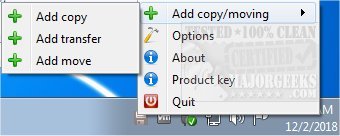
Ultracopier 3.0.2.0 has been released, enhancing its functionality as an Open Source file management utility that specializes in efficiently copying, moving, and transferring files and folders. This software serves as a robust alternative to the standard Windows Explorer file copy dialogs, significantly improving the user experience by reducing the time and effort required to manage files, whether they are documents, photos, or other types of data.
One of the key advantages of Ultracopier is its user-friendly interface, which allows users to manage and organize their files with ease. It offers features such as the ability to view all files in a queue, control the order of operations, and pause or resume transfers as needed. Users can also choose to skip files that may be problematic, making it a highly flexible tool.
Some notable features of Ultracopier include:
- Play/pause functionality for file transfers
- Speed limitation options to control transfer rates
- On-error resume capabilities that allow transfers to continue after interruptions
- Effective error and collision management to handle issues gracefully
- Data security features to protect sensitive information
- Intelligent reorganization of transfers to enhance overall performance
Ultracopier is designed to cater to users of all skill levels, ensuring that both novices and experienced users can benefit from its advanced file management features.
In addition to Ultracopier, users interested in optimizing their file management experience may also find guides on related topics helpful, such as changing default drag and drop actions in Windows, resetting and clearing frequent places and recent items in Windows 10 and 11, and customizing folder view settings for better accessibility.
Overall, Ultracopier 3.0.2.0 represents a significant step forward for users seeking a faster and more efficient way to handle their file operations, making it a worthwhile addition to any file management toolkit
One of the key advantages of Ultracopier is its user-friendly interface, which allows users to manage and organize their files with ease. It offers features such as the ability to view all files in a queue, control the order of operations, and pause or resume transfers as needed. Users can also choose to skip files that may be problematic, making it a highly flexible tool.
Some notable features of Ultracopier include:
- Play/pause functionality for file transfers
- Speed limitation options to control transfer rates
- On-error resume capabilities that allow transfers to continue after interruptions
- Effective error and collision management to handle issues gracefully
- Data security features to protect sensitive information
- Intelligent reorganization of transfers to enhance overall performance
Ultracopier is designed to cater to users of all skill levels, ensuring that both novices and experienced users can benefit from its advanced file management features.
In addition to Ultracopier, users interested in optimizing their file management experience may also find guides on related topics helpful, such as changing default drag and drop actions in Windows, resetting and clearing frequent places and recent items in Windows 10 and 11, and customizing folder view settings for better accessibility.
Overall, Ultracopier 3.0.2.0 represents a significant step forward for users seeking a faster and more efficient way to handle their file operations, making it a worthwhile addition to any file management toolkit
Ultracopier 3.0.2.0 released
Ultracopier is an Open Source file management utility designed for fast copying, moving, and transferring of files/folders.