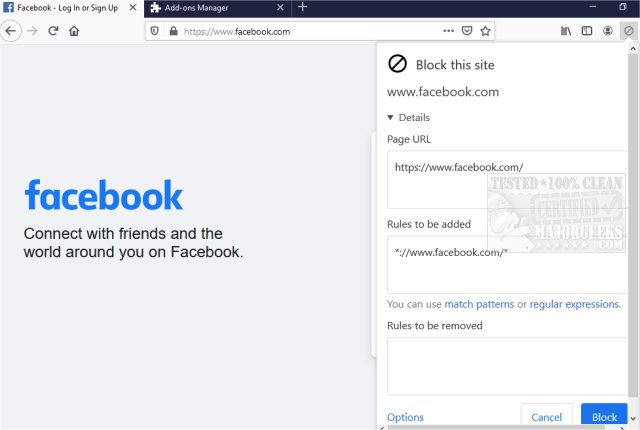
The latest version of uBlacklist, 9.3.0, has been released for both Chrome and Firefox, offering users the ability to streamline their Google search results by removing specific websites. This tool empowers individuals to customize their browsing experience by blocking unwanted sites from appearing in search results. Users can easily create rules for exclusion by clicking the toolbar icon and specifying sites through match patterns (for example, *://*.example.com/*) or regular expressions (such as /example\.(net|org)/).
In addition to the straightforward process of adding sites to the blacklist, uBlacklist also supports syncing blacklists across devices using Google Drive and allows users to subscribe to public blacklists. This feature is particularly useful for research purposes, enabling users to focus on relevant topics without the distraction of nonessential or low-quality results. Furthermore, it can help users avoid time-wasting content, making it an essential tool for anyone looking to optimize their online search experience.
As an extension of this functionality, uBlacklist could also integrate machine learning algorithms to suggest potential sites to block based on user behavior, enhancing the personalization aspect. Additionally, future releases might include features that allow users to categorize blacklisted sites, making it easier to manage multiple areas of interest or research topics. Overall, uBlacklist stands out as a valuable resource for improving search efficiency and productivity on the web
In addition to the straightforward process of adding sites to the blacklist, uBlacklist also supports syncing blacklists across devices using Google Drive and allows users to subscribe to public blacklists. This feature is particularly useful for research purposes, enabling users to focus on relevant topics without the distraction of nonessential or low-quality results. Furthermore, it can help users avoid time-wasting content, making it an essential tool for anyone looking to optimize their online search experience.
As an extension of this functionality, uBlacklist could also integrate machine learning algorithms to suggest potential sites to block based on user behavior, enhancing the personalization aspect. Additionally, future releases might include features that allow users to categorize blacklisted sites, making it easier to manage multiple areas of interest or research topics. Overall, uBlacklist stands out as a valuable resource for improving search efficiency and productivity on the web
uBlacklist for Chrome and Firefox 9.3.0 released
uBlacklist for Chrome and Firefox removes specific sites from showing up in Google search.
uBlacklist for Chrome and Firefox 9.3.0 released @ MajorGeeks