Typora 1.13.2 has been released, further enhancing its capabilities as a versatile Markdown editor. This utility stands out by allowing users to efficiently convert, edit, format, and write text in HTML through a sleek and customizable interface, catering to users of all skill levels. Its design is particularly welcoming for beginners while still offering powerful features that experienced users will appreciate.
One of Typora's key features is its dual-panel setup, which includes a file tree and article panels for effective file management. Users can organize their documents into folders and easily sync them with cloud services like Dropbox. The software also features an outline structure that enables users to view and navigate their documents quickly through an outline panel, allowing for seamless access to specific sections.
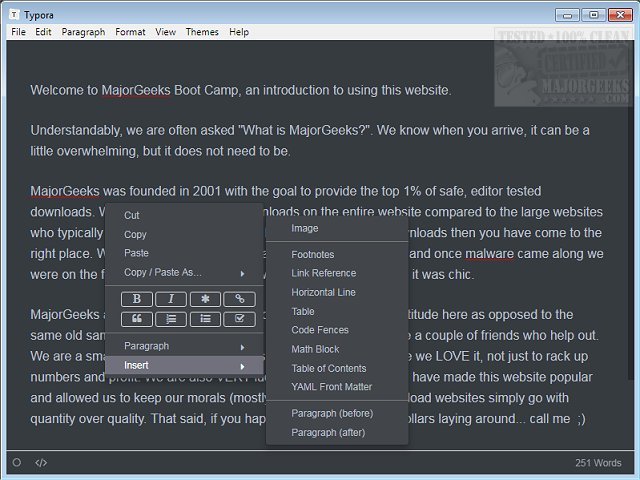
During testing, the Night mode was utilized, but Typora offers a variety of themes to suit different user preferences. The application provides a comprehensive word count for documents and includes a Focus Mode that helps users concentrate on the current line by blurring out the rest. Additionally, the Typewriter Mode presents the active line in the center of the screen, enhancing the writing experience.
Users can easily insert elements such as images, footnotes, tables, code blocks, math equations, and more through the right-click context menu. Typora also allows for text customization and editing through accessible format and classic paragraph menus. Overall, Typora is a reliable, user-friendly editor that combines functionality with aesthetic appeal, making it an excellent choice for anyone interested in Markdown editing.
In future updates, users can anticipate even more features that may include enhanced collaboration tools, improved export options, and further customization capabilities to cater to evolving user needs. The ongoing development of Typora indicates a commitment to providing a robust writing environment that adapts to the demands of modern content creation
One of Typora's key features is its dual-panel setup, which includes a file tree and article panels for effective file management. Users can organize their documents into folders and easily sync them with cloud services like Dropbox. The software also features an outline structure that enables users to view and navigate their documents quickly through an outline panel, allowing for seamless access to specific sections.
During testing, the Night mode was utilized, but Typora offers a variety of themes to suit different user preferences. The application provides a comprehensive word count for documents and includes a Focus Mode that helps users concentrate on the current line by blurring out the rest. Additionally, the Typewriter Mode presents the active line in the center of the screen, enhancing the writing experience.
Users can easily insert elements such as images, footnotes, tables, code blocks, math equations, and more through the right-click context menu. Typora also allows for text customization and editing through accessible format and classic paragraph menus. Overall, Typora is a reliable, user-friendly editor that combines functionality with aesthetic appeal, making it an excellent choice for anyone interested in Markdown editing.
In future updates, users can anticipate even more features that may include enhanced collaboration tools, improved export options, and further customization capabilities to cater to evolving user needs. The ongoing development of Typora indicates a commitment to providing a robust writing environment that adapts to the demands of modern content creation
Typora 1.13.2 released
Typora is a utility that enables you to convert, edit, format, and write text to HTML in an efficient manner through a modern, customizable interface that is perfect for any skill-level user.