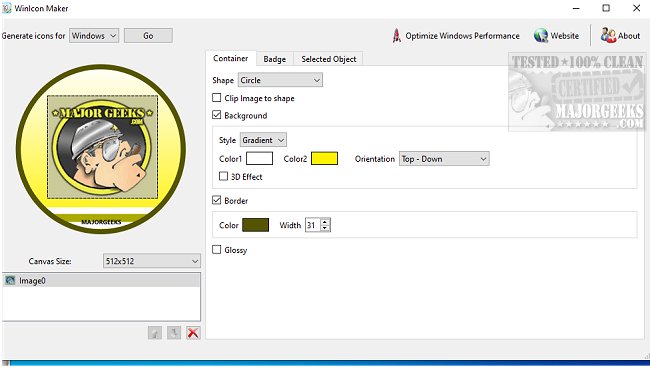
TweakNow has released version 2.0.2 of its software, TweakNow WinIcon, which provides an easy way to create custom Windows icons from PNG or JPG images. This application is user-friendly, featuring a straightforward interface with three tabs: container, badge, and selected object. Each tab allows for specific modifications to the chosen image, giving users the flexibility to design icons that are easily recognizable and personalized.
The app enables users to create icons in ICO format (suitable for Windows) or PNG format, with a maximum resolution of 256x256 pixels. It supports canvas sizes up to 1024x1024 pixels and allows for various shapes like circles, rounded rectangles, and regular rectangles. Users can also apply colored backgrounds—either solid or gradient—and add visual effects like 3D or glossy finishes. While the app provides real-time previews of the final layout, it does not support pixel-level editing.
Once users are satisfied with their designs, they can save the icons and easily set them up on their desktop by navigating to Settings > Personalization > Themes, and then selecting Desktop Icon Settings. This straightforward process involves choosing the desired icons, browsing to the location of the newly created icon, and applying the changes.
In addition to its basic functionalities, TweakNow WinIcon could benefit from future updates that include pixel-level editing capabilities, more advanced design tools, or additional icon formats. Users might also appreciate tutorials or templates to inspire their icon creations, thus enhancing the overall user experience. Overall, TweakNow WinIcon is a practical tool for anyone looking to personalize their Windows desktop with unique icons
The app enables users to create icons in ICO format (suitable for Windows) or PNG format, with a maximum resolution of 256x256 pixels. It supports canvas sizes up to 1024x1024 pixels and allows for various shapes like circles, rounded rectangles, and regular rectangles. Users can also apply colored backgrounds—either solid or gradient—and add visual effects like 3D or glossy finishes. While the app provides real-time previews of the final layout, it does not support pixel-level editing.
Once users are satisfied with their designs, they can save the icons and easily set them up on their desktop by navigating to Settings > Personalization > Themes, and then selecting Desktop Icon Settings. This straightforward process involves choosing the desired icons, browsing to the location of the newly created icon, and applying the changes.
In addition to its basic functionalities, TweakNow WinIcon could benefit from future updates that include pixel-level editing capabilities, more advanced design tools, or additional icon formats. Users might also appreciate tutorials or templates to inspire their icon creations, thus enhancing the overall user experience. Overall, TweakNow WinIcon is a practical tool for anyone looking to personalize their Windows desktop with unique icons
TweakNow WinIcon 2.0.2 released
TweakNow WinIcon is a simple option that permits you to create Windows icons from any PNG or JPG image.