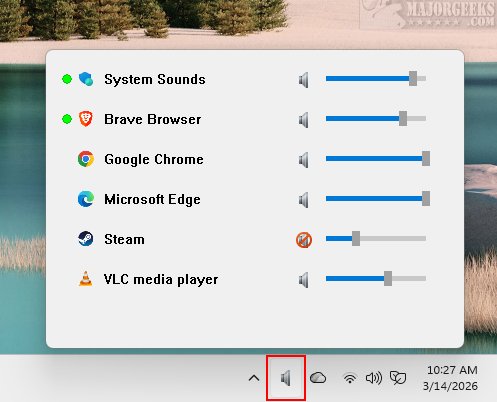
TweakNow Volume Hub 1.2.0 has been released as a lightweight and efficient portable volume mixer specifically designed for Windows 11. This user-friendly application allows users to easily adjust the volume levels for individual applications, offering a customized audio experience. It operates quietly from the system tray, ensuring that audio management does not disrupt your workflow.
The challenge users often face is that while the overall audio volume can be adjusted using keyboard shortcuts, accessing the Windows volume mixer to manage audio levels for specific applications requires several steps. TweakNow Volume Hub simplifies this process by consolidating audio controls into a single, intuitive tray utility. With just a click on the icon, users gain access to a menu displaying all applications that are generating audio, allowing for manual volume adjustments via dedicated sliders for each app.
The application is designed to operate seamlessly from the system tray, making it lightweight and resource-efficient. Interaction is straightforward: clicking the icon brings up the application while clicking elsewhere hides it, promoting an uninterrupted workflow. TweakNow Volume Hub features a modern design with rounded corners and dark scrollbars, blending well into the Windows 11 environment while remaining portable and efficient.
For those frustrated by the cumbersome navigation required to mute a background application, TweakNow Volume Hub offers a quick solution. This "one-click" tray utility provides instant access to the entire Windows Audio Engine, proving to be a valuable tool for users seeking effective audio control.
In addition to its core functionality, TweakNow Volume Hub's portability means that it can be easily carried on USB drives, making it accessible across multiple devices without installation. As audio needs evolve, this tool may continue to enhance its features, potentially integrating with additional audio technologies and providing more customization options for a wide range of users.
For related tips and tricks, users may also explore guides on enabling Windows Sonic Surround Sound, renaming sound input/output devices, adjusting audio balance, and changing the default sound output device in Windows 10 and 11
The challenge users often face is that while the overall audio volume can be adjusted using keyboard shortcuts, accessing the Windows volume mixer to manage audio levels for specific applications requires several steps. TweakNow Volume Hub simplifies this process by consolidating audio controls into a single, intuitive tray utility. With just a click on the icon, users gain access to a menu displaying all applications that are generating audio, allowing for manual volume adjustments via dedicated sliders for each app.
The application is designed to operate seamlessly from the system tray, making it lightweight and resource-efficient. Interaction is straightforward: clicking the icon brings up the application while clicking elsewhere hides it, promoting an uninterrupted workflow. TweakNow Volume Hub features a modern design with rounded corners and dark scrollbars, blending well into the Windows 11 environment while remaining portable and efficient.
For those frustrated by the cumbersome navigation required to mute a background application, TweakNow Volume Hub offers a quick solution. This "one-click" tray utility provides instant access to the entire Windows Audio Engine, proving to be a valuable tool for users seeking effective audio control.
In addition to its core functionality, TweakNow Volume Hub's portability means that it can be easily carried on USB drives, making it accessible across multiple devices without installation. As audio needs evolve, this tool may continue to enhance its features, potentially integrating with additional audio technologies and providing more customization options for a wide range of users.
For related tips and tricks, users may also explore guides on enabling Windows Sonic Surround Sound, renaming sound input/output devices, adjusting audio balance, and changing the default sound output device in Windows 10 and 11
TweakNow Volume Hub 1.2.0 released
TweakNow Volume Hub: an efficient and lightweight portable volume mixer designed specifically for Windows 11. It lets you easily adjust the volume for individual applications, providing a customized audio experience.