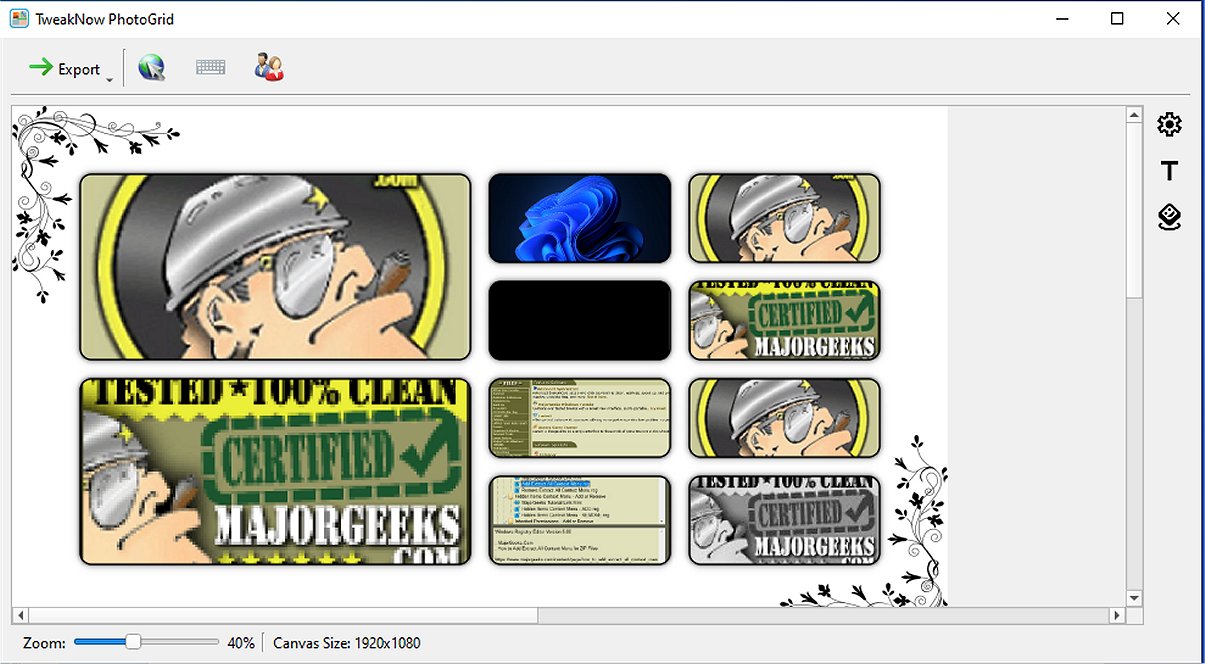
TweakNow PhotoGrid has released version 2.3.0, enhancing its user-friendly collage maker that allows users to quickly create beautiful photo layouts in just seconds. The app is designed with a convenient drag-and-drop interface, making it easy to transform regular photos into captivating, shareable collages. Ideal for commemorating special events or unleashing creativity, TweakNow PhotoGrid provides a quick and enjoyable way to produce visually appealing compositions.
The software supports the creation of collages using up to 10 images, offering a simple user interface where users can choose from various templates and arrange their photos effortlessly. With a range of layouts designed for different numbers of images, TweakNow PhotoGrid ensures that each collage presents a unique design. Users can personalize their collages by selecting the canvas type, customizing paper size and orientation for printing, and choosing solid colors or textures as backgrounds. Additionally, frame margins can be adjusted for a polished finish.
To enhance creativity, users can add labels, stickers, and emojis, customizing fonts, colors, and sizes for each element. Finished collages can be saved in multiple formats, including PNG, JPG, TIFF, GIF, and WEBP. A clipboard feature enables easy sharing of completed collages directly from the application.
In summary, TweakNow PhotoGrid stands out due to its intuitive design and extensive customization options, making collage creation effortless. Future enhancements could include features that optimize collages for various social media platforms, further expanding its utility and appeal.
Extended Overview:
As technology continues to evolve, user-friendly applications like TweakNow PhotoGrid play a crucial role in enabling individuals to express their creativity without requiring advanced graphic design skills. This latest version not only simplifies the process of collage creation but also encourages users to explore their artistic side through various customization features. The ability to save and share collages in multiple formats ensures compatibility with different platforms, catering to a broad audience.
Moreover, as social media continues to dominate communication, the demand for visually appealing content is on the rise. TweakNow PhotoGrid's capability to create tailored designs can be particularly beneficial for influencers, marketers, and everyday users looking to enhance their social media presence. By integrating social media optimization features, such as pre-set dimensions for popular platforms or templates designed for specific campaigns, TweakNow could solidify its position as a go-to tool for digital content creators.
Overall, TweakNow PhotoGrid 2.3.0 is not just a collage maker; it is a gateway for users to unleash their creativity and share memorable moments with ease
The software supports the creation of collages using up to 10 images, offering a simple user interface where users can choose from various templates and arrange their photos effortlessly. With a range of layouts designed for different numbers of images, TweakNow PhotoGrid ensures that each collage presents a unique design. Users can personalize their collages by selecting the canvas type, customizing paper size and orientation for printing, and choosing solid colors or textures as backgrounds. Additionally, frame margins can be adjusted for a polished finish.
To enhance creativity, users can add labels, stickers, and emojis, customizing fonts, colors, and sizes for each element. Finished collages can be saved in multiple formats, including PNG, JPG, TIFF, GIF, and WEBP. A clipboard feature enables easy sharing of completed collages directly from the application.
In summary, TweakNow PhotoGrid stands out due to its intuitive design and extensive customization options, making collage creation effortless. Future enhancements could include features that optimize collages for various social media platforms, further expanding its utility and appeal.
Extended Overview:
As technology continues to evolve, user-friendly applications like TweakNow PhotoGrid play a crucial role in enabling individuals to express their creativity without requiring advanced graphic design skills. This latest version not only simplifies the process of collage creation but also encourages users to explore their artistic side through various customization features. The ability to save and share collages in multiple formats ensures compatibility with different platforms, catering to a broad audience.
Moreover, as social media continues to dominate communication, the demand for visually appealing content is on the rise. TweakNow PhotoGrid's capability to create tailored designs can be particularly beneficial for influencers, marketers, and everyday users looking to enhance their social media presence. By integrating social media optimization features, such as pre-set dimensions for popular platforms or templates designed for specific campaigns, TweakNow could solidify its position as a go-to tool for digital content creators.
Overall, TweakNow PhotoGrid 2.3.0 is not just a collage maker; it is a gateway for users to unleash their creativity and share memorable moments with ease
TweakNow PhotoGrid 2.3.0 released
TweakNow PhotoGrid offers a user-friendly collage maker enabling you to effortlessly craft stunning photo layouts in mere seconds.