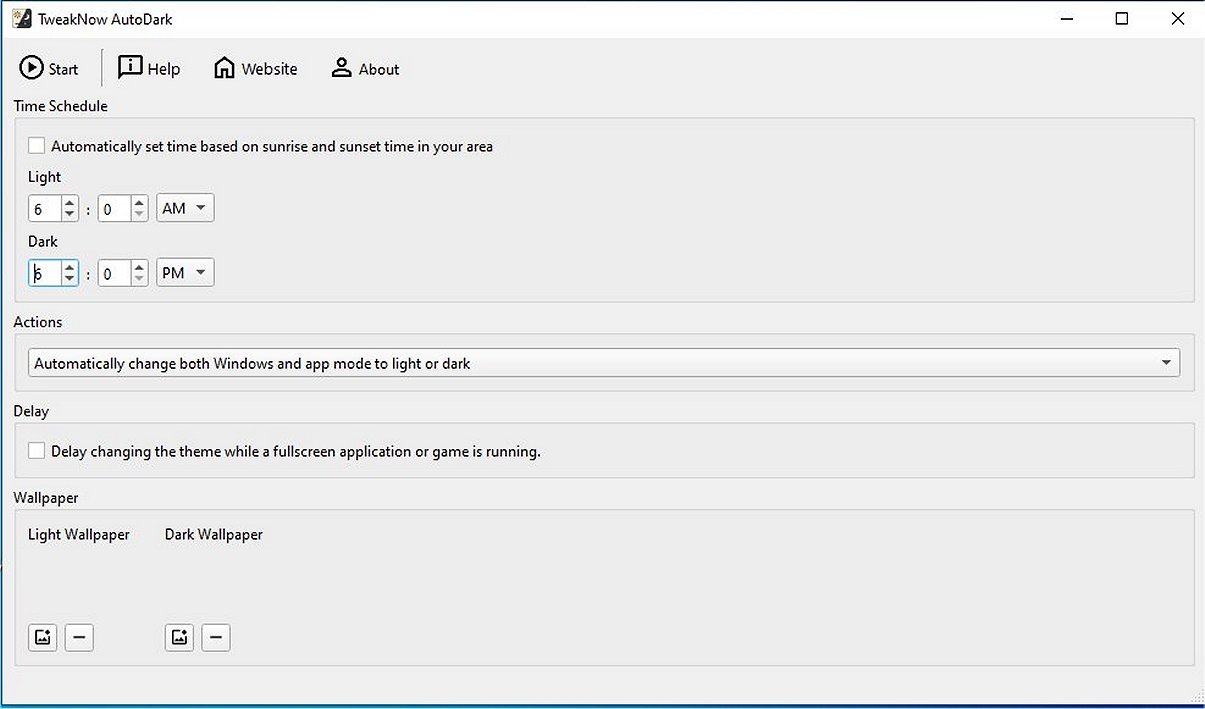
TweakNow has released version 1.1.0 of AutoDark, a lightweight application designed to automatically switch between light and dark themes based on user-defined schedules. This feature is particularly beneficial for users who prefer a smooth transition from day to night on their desktop systems. TweakNow AutoDark eliminates the need for manual adjustments, automatically changing themes according to individual preferences.
A notable functionality of the program is its smart delay feature, which prevents theme switching during full-screen applications or games, ensuring an uninterrupted user experience. Additionally, the application can synchronize wallpaper changes with the current theme, enhancing the overall aesthetic of the desktop environment.
For those seeking a more tailored experience, TweakNow AutoDark introduces TweakNow WinSecret Plus. This extension allows for advanced customization options and a wider range of features, providing comprehensive control over the appearance and operation of your PC. By default, AutoDark adjusts both the Windows interface and application modes, but users can customize it to change only one aspect based on their preferences.
Key features of TweakNow AutoDark include:
- Automatic Theme Switching: Manages theme changes without the need to access Windows settings.
- Distraction-Free Gaming & Full-Screen Mode: Delays theme changes during full-screen applications to avoid interruptions.
- Wallpaper Sync: Adjusts wallpapers to match the active theme, providing a cohesive look.
The application not only improves aesthetics but also contributes to eye comfort by reducing strain through its automatic theme adjustments. Moreover, it allows users to set theme changes based on various parameters such as personalized schedules or geographic location, optimizing visual comfort throughout the day.
In conclusion, TweakNow AutoDark is a sophisticated tool that enhances user experience in Windows 10 and 11 by allowing for seamless transitions between light and dark themes, making it an essential application for those looking to improve their desktop environment.
- Adaptive Brightness: Automatically adjusting brightness levels based on ambient light conditions.
- User Profiles: Allowing different settings for different users on the same device, enabling personalized experiences.
- Scheduling Options: Enhanced scheduling that accounts for seasonal changes in daylight hours.
- Integration with Other Apps: Collaborating with popular applications to implement theme changes based on in-app settings or user activity.
These enhancements could further enrich the user experience and solidify TweakNow AutoDark’s place as a leading application for theme management in Windows environments
A notable functionality of the program is its smart delay feature, which prevents theme switching during full-screen applications or games, ensuring an uninterrupted user experience. Additionally, the application can synchronize wallpaper changes with the current theme, enhancing the overall aesthetic of the desktop environment.
For those seeking a more tailored experience, TweakNow AutoDark introduces TweakNow WinSecret Plus. This extension allows for advanced customization options and a wider range of features, providing comprehensive control over the appearance and operation of your PC. By default, AutoDark adjusts both the Windows interface and application modes, but users can customize it to change only one aspect based on their preferences.
Key features of TweakNow AutoDark include:
- Automatic Theme Switching: Manages theme changes without the need to access Windows settings.
- Distraction-Free Gaming & Full-Screen Mode: Delays theme changes during full-screen applications to avoid interruptions.
- Wallpaper Sync: Adjusts wallpapers to match the active theme, providing a cohesive look.
The application not only improves aesthetics but also contributes to eye comfort by reducing strain through its automatic theme adjustments. Moreover, it allows users to set theme changes based on various parameters such as personalized schedules or geographic location, optimizing visual comfort throughout the day.
In conclusion, TweakNow AutoDark is a sophisticated tool that enhances user experience in Windows 10 and 11 by allowing for seamless transitions between light and dark themes, making it an essential application for those looking to improve their desktop environment.
Extended Ideas:
In future updates, TweakNow could consider integrating additional features such as:- Adaptive Brightness: Automatically adjusting brightness levels based on ambient light conditions.
- User Profiles: Allowing different settings for different users on the same device, enabling personalized experiences.
- Scheduling Options: Enhanced scheduling that accounts for seasonal changes in daylight hours.
- Integration with Other Apps: Collaborating with popular applications to implement theme changes based on in-app settings or user activity.
These enhancements could further enrich the user experience and solidify TweakNow AutoDark’s place as a leading application for theme management in Windows environments
TweakNow AutoDark 1.1.0 released
TweakNow AutoDark is a lightweight program offering automatic switching between light and dark themes based on user-defined schedules. This feature is ideal for those who seek a seamless transition from day to night on their desktop.