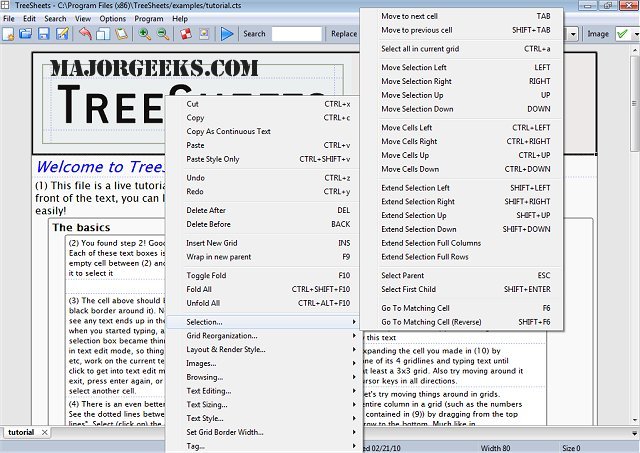
TreeSheets, recently updated to version 3017, is an innovative application that combines the functionalities of spreadsheets, mind mappers, outliners, personal information managers (PIMs), text editors, and small database utilities into a single, versatile tool. It aims to provide a more intuitive and flexible solution for managing data than traditional spreadsheet or outlining software.
What Makes TreeSheets Unique?
TreeSheets stands out by offering a hierarchical spreadsheet format that allows users to organize data in a structured yet flexible manner. Unlike conventional spreadsheets that can feel flat or rigid, TreeSheets integrates the best aspects of mind mapping and outlining, providing a user-friendly interface reminiscent of sticky notes on a whiteboard—but with layers and easy cross-referencing capabilities.
Core Features of TreeSheets:
- Hierarchical Data Organization: TreeSheets allows users to create nested rows for project breakdowns, making it ideal for managing to-do lists and other hierarchical tasks.
- Outlining and Mind Mapping: Users can structure their ideas and tasks without the complexity of dedicated software, providing a seamless experience for brainstorming and organizing thoughts.
- Compact Data Management: It functions effectively as a small database or PIM, enabling users to manage contacts, inventories, and presentations with linked notes all in one place.
While its versatility is appealing, it also presents a challenge; TreeSheets aims to serve multiple purposes, which may dilute its effectiveness in specific areas compared to specialized tools. However, for those looking for an efficient way to manage tasks within a single framework, it proves to be remarkably effective.
Practical Applications:
TreeSheets is not just visually appealing; it provides practical functionality for various tasks, including:
- Project Planning: Break down goals into actionable steps that are neatly arranged and cross-linked.
- To-Do Lists: Create organized lists that feel more intuitive than traditional nested outlines.
- Brainstorming: Visualize thoughts and their connections in a hierarchical view without losing track of ideas across separate sheets.
- Information Organization: Keep related data compactly structured for easy access and management.
Additionally, TreeSheets supports text editing and allows users to save their work in multiple formats such as XML, CSV, HTML, and images, making it convenient for importing and exporting data.
Lightweight and Efficient Performance:
One of the significant advantages of TreeSheets is its lightweight design, making it efficient even on older systems like Windows 7. It consumes only about 5MB of memory, even when multiple documents are open, allowing users to run the application quietly in the background without hindering system performance.
Final Verdict:
TreeSheets is a compelling choice for anyone seeking a versatile tool for data organization that combines features from various applications without the clutter. Its hierarchical structure excels at providing order while remaining user-friendly. However, it does not aim to replace highly specialized software for every function; instead, it offers a framework for various tasks without overwhelming users with complexity.
For those in search of an all-in-one solution to handle a wide range of data-heavy tasks without the bloat of specialized applications, TreeSheets is worth exploring. Its unique approach to data organization makes it a valuable addition to any productivity toolkit
What Makes TreeSheets Unique?
TreeSheets stands out by offering a hierarchical spreadsheet format that allows users to organize data in a structured yet flexible manner. Unlike conventional spreadsheets that can feel flat or rigid, TreeSheets integrates the best aspects of mind mapping and outlining, providing a user-friendly interface reminiscent of sticky notes on a whiteboard—but with layers and easy cross-referencing capabilities.
Core Features of TreeSheets:
- Hierarchical Data Organization: TreeSheets allows users to create nested rows for project breakdowns, making it ideal for managing to-do lists and other hierarchical tasks.
- Outlining and Mind Mapping: Users can structure their ideas and tasks without the complexity of dedicated software, providing a seamless experience for brainstorming and organizing thoughts.
- Compact Data Management: It functions effectively as a small database or PIM, enabling users to manage contacts, inventories, and presentations with linked notes all in one place.
While its versatility is appealing, it also presents a challenge; TreeSheets aims to serve multiple purposes, which may dilute its effectiveness in specific areas compared to specialized tools. However, for those looking for an efficient way to manage tasks within a single framework, it proves to be remarkably effective.
Practical Applications:
TreeSheets is not just visually appealing; it provides practical functionality for various tasks, including:
- Project Planning: Break down goals into actionable steps that are neatly arranged and cross-linked.
- To-Do Lists: Create organized lists that feel more intuitive than traditional nested outlines.
- Brainstorming: Visualize thoughts and their connections in a hierarchical view without losing track of ideas across separate sheets.
- Information Organization: Keep related data compactly structured for easy access and management.
Additionally, TreeSheets supports text editing and allows users to save their work in multiple formats such as XML, CSV, HTML, and images, making it convenient for importing and exporting data.
Lightweight and Efficient Performance:
One of the significant advantages of TreeSheets is its lightweight design, making it efficient even on older systems like Windows 7. It consumes only about 5MB of memory, even when multiple documents are open, allowing users to run the application quietly in the background without hindering system performance.
Final Verdict:
TreeSheets is a compelling choice for anyone seeking a versatile tool for data organization that combines features from various applications without the clutter. Its hierarchical structure excels at providing order while remaining user-friendly. However, it does not aim to replace highly specialized software for every function; instead, it offers a framework for various tasks without overwhelming users with complexity.
For those in search of an all-in-one solution to handle a wide range of data-heavy tasks without the bloat of specialized applications, TreeSheets is worth exploring. Its unique approach to data organization makes it a valuable addition to any productivity toolkit
TreeSheets 3017 released
TreeSheets combines spreadsheet tools, mind mappers, outliners, personal information managers, text editors and small database utilities into an all-in-one office application.