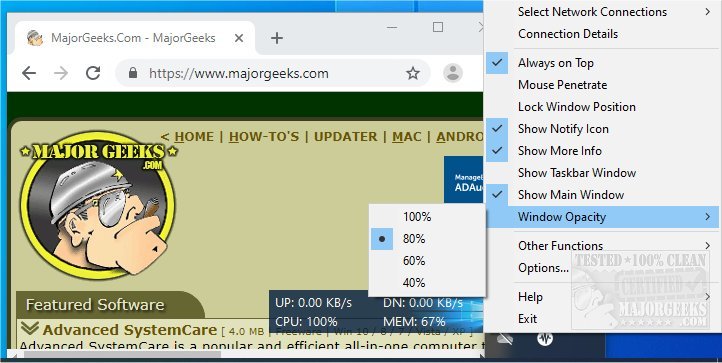
TrafficMonitor version 1.86 has been released, providing users with a straightforward and portable desktop utility for real-time monitoring of network speed, CPU usage, and memory consumption. This lightweight tool serves as an accessible means to keep track of system performance without the need to navigate complex menus, presenting essential information in a customizable and user-friendly interface.
Monitoring network traffic is essential for both IT professionals and everyday users. Unexpected increases in network usage can indicate that background applications, automatic updates, or even malware are consuming bandwidth. For those engaged in activities like streaming, gaming, or cloud backups, being aware of bandwidth usage can help mitigate slow connections and prevent overage charges on limited data plans. Real-time monitoring is particularly advantageous for gamers and streamers who need to identify and shut down unnecessary applications that might be causing high latency. Additionally, if network usage spikes when the internet is not in use, it may suggest unauthorized access to your Wi-Fi network.
If issues arise, users can turn to more advanced tools such as Glasswire, ProcessHacker, or NetLimiter for deeper analysis.
TrafficMonitor boasts several features for effective real-time tracking:
- Network Speed Display: Instantly view current upload and download rates.
- CPU Usage Monitoring: Keep tabs on processor load to identify potential slowdowns.
- Memory Consumption Tracking: Monitor RAM usage to avoid bottlenecks.
- Compact User Interface: Access detailed statistics like connection type and default gateway with a simple right-click on the system tray icon.
- Customization Options: Adjust what information appears in the taskbar and personalize the UI with skins.
- Traffic History: Review historical data for trends in network usage.
- Notification Alerts: Set alerts based on defined usage thresholds.
For those seeking a straightforward tool to monitor network speed, CPU, and RAM usage without heavy system impact, TrafficMonitor proves to be an excellent option. Its simplicity and effectiveness allow users to receive real-time statistics without burdening their machines. The tool empowers users to maintain network performance, troubleshoot potential issues, and manage background processes effectively.
As technology continues to evolve, the need for user-friendly monitoring tools like TrafficMonitor becomes increasingly important. Future updates could incorporate features such as automated optimization suggestions based on usage patterns, enhanced security alerts for unusual activity, and integration with smart home devices to provide a comprehensive overview of network health. Additionally, expanding support for various operating systems and platforms would make TrafficMonitor accessible to a broader audience, enhancing its utility in diverse computing environments. Ultimately, as more individuals rely on internet connectivity for work and leisure, tools like TrafficMonitor will play a critical role in ensuring optimal performance and security
Why Monitor Your Traffic?
Monitoring network traffic is essential for both IT professionals and everyday users. Unexpected increases in network usage can indicate that background applications, automatic updates, or even malware are consuming bandwidth. For those engaged in activities like streaming, gaming, or cloud backups, being aware of bandwidth usage can help mitigate slow connections and prevent overage charges on limited data plans. Real-time monitoring is particularly advantageous for gamers and streamers who need to identify and shut down unnecessary applications that might be causing high latency. Additionally, if network usage spikes when the internet is not in use, it may suggest unauthorized access to your Wi-Fi network.
If issues arise, users can turn to more advanced tools such as Glasswire, ProcessHacker, or NetLimiter for deeper analysis.
Key Features of TrafficMonitor
TrafficMonitor boasts several features for effective real-time tracking:
- Network Speed Display: Instantly view current upload and download rates.
- CPU Usage Monitoring: Keep tabs on processor load to identify potential slowdowns.
- Memory Consumption Tracking: Monitor RAM usage to avoid bottlenecks.
- Compact User Interface: Access detailed statistics like connection type and default gateway with a simple right-click on the system tray icon.
- Customization Options: Adjust what information appears in the taskbar and personalize the UI with skins.
- Traffic History: Review historical data for trends in network usage.
- Notification Alerts: Set alerts based on defined usage thresholds.
Conclusion
For those seeking a straightforward tool to monitor network speed, CPU, and RAM usage without heavy system impact, TrafficMonitor proves to be an excellent option. Its simplicity and effectiveness allow users to receive real-time statistics without burdening their machines. The tool empowers users to maintain network performance, troubleshoot potential issues, and manage background processes effectively.
Extension
As technology continues to evolve, the need for user-friendly monitoring tools like TrafficMonitor becomes increasingly important. Future updates could incorporate features such as automated optimization suggestions based on usage patterns, enhanced security alerts for unusual activity, and integration with smart home devices to provide a comprehensive overview of network health. Additionally, expanding support for various operating systems and platforms would make TrafficMonitor accessible to a broader audience, enhancing its utility in diverse computing environments. Ultimately, as more individuals rely on internet connectivity for work and leisure, tools like TrafficMonitor will play a critical role in ensuring optimal performance and security
TrafficMonitor 1.86 released
TrafficMonitor is a simple portable desktop tool that allows you to monitor your network speed in real-time as well as memory and computer usage.