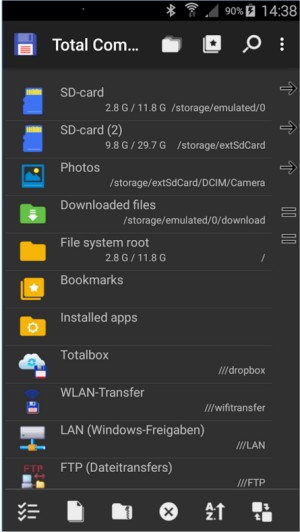
Total Commander, a robust file management tool for Windows and Android, has recently released its version 11.57 Beta 4 alongside 11.56, continuing its legacy that dates back to the 1990s. Unlike Windows Explorer, which can feel simplistic and limiting, Total Commander offers a powerful dual-pane interface that allows for efficient file management, whether you're transferring files between directories, USB drives, or network shares.
This file manager stands out with its extensive support for various archive formats including ZIP, RAR, and 7Z, enabling users to manage archives without the need for additional software. Its built-in FTP client, while perhaps not essential for every user, provides a straightforward and reliable way to connect to remote servers for backups or site maintenance, supporting secure protocols like FTPS and SFTP.
Total Commander is highly customizable, with a vast ecosystem of plugins that enhance its functionality, allowing users to perform tasks like browsing Android devices or syncing with cloud services without needing third-party applications. For those who prefer keyboard shortcuts, Total Commander offers a keyboard-driven experience that can significantly speed up file operations.
Real-world applications of Total Commander include batch renaming files, managing large backups, and efficiently cleaning up systems by searching for duplicate or unnecessary files. The Multi-Rename Tool is particularly praised for its versatility, allowing users to rename multiple files at once with various customizable options.
While Total Commander excels in functionality, some users may find its user interface outdated, although it can be skinned for a more modern look. Additionally, the learning curve for its layout and shortcuts may require some time investment, making it less suitable for users who favor more visually appealing interfaces.
In summary, Total Commander is a utility-focused file manager that prioritizes efficiency and power, ideal for various users, including power users, system administrators, and developers. Its lack of ads, lightweight resource usage, and absence of intrusive features make it an invaluable tool for effective file management. Despite a minor challenge question in the free version, its capabilities make it a deserving addition to any user's toolkit, streamlining tasks from file organization to server management.
For those who have yet to experience its prowess, Total Commander promises to elevate your file management game, ensuring that once integrated into your workflow, it will become an indispensable tool
This file manager stands out with its extensive support for various archive formats including ZIP, RAR, and 7Z, enabling users to manage archives without the need for additional software. Its built-in FTP client, while perhaps not essential for every user, provides a straightforward and reliable way to connect to remote servers for backups or site maintenance, supporting secure protocols like FTPS and SFTP.
Total Commander is highly customizable, with a vast ecosystem of plugins that enhance its functionality, allowing users to perform tasks like browsing Android devices or syncing with cloud services without needing third-party applications. For those who prefer keyboard shortcuts, Total Commander offers a keyboard-driven experience that can significantly speed up file operations.
Real-world applications of Total Commander include batch renaming files, managing large backups, and efficiently cleaning up systems by searching for duplicate or unnecessary files. The Multi-Rename Tool is particularly praised for its versatility, allowing users to rename multiple files at once with various customizable options.
While Total Commander excels in functionality, some users may find its user interface outdated, although it can be skinned for a more modern look. Additionally, the learning curve for its layout and shortcuts may require some time investment, making it less suitable for users who favor more visually appealing interfaces.
In summary, Total Commander is a utility-focused file manager that prioritizes efficiency and power, ideal for various users, including power users, system administrators, and developers. Its lack of ads, lightweight resource usage, and absence of intrusive features make it an invaluable tool for effective file management. Despite a minor challenge question in the free version, its capabilities make it a deserving addition to any user's toolkit, streamlining tasks from file organization to server management.
For those who have yet to experience its prowess, Total Commander promises to elevate your file management game, ensuring that once integrated into your workflow, it will become an indispensable tool
Total Commander 11.57 Beta 4 / 11.56 released
Total Commander is an all-in-one file manager for your Windows and Android devices.