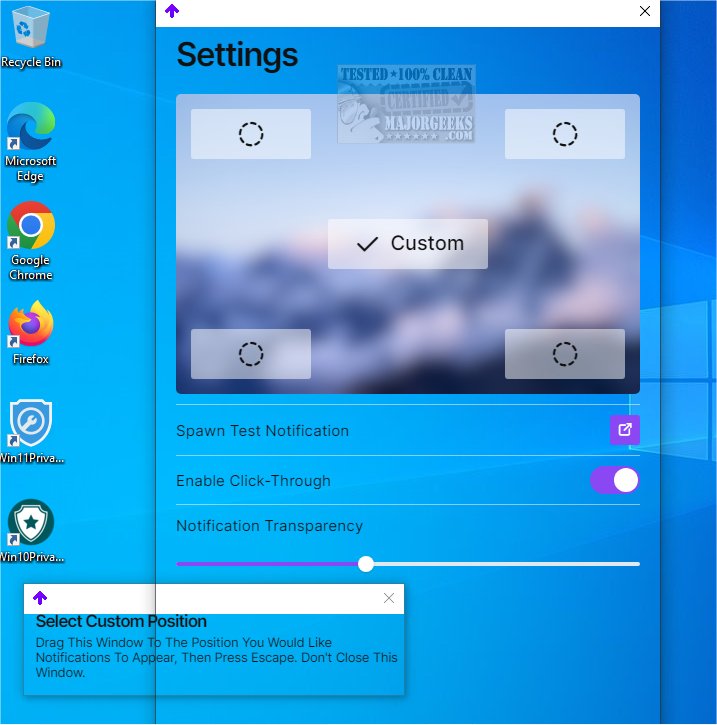
TopNotify has unveiled its latest version, 3.1.1, which empowers users to customize the display of Windows notifications by directing them to specific areas of their screens. Users can select from four preset positions—top left, top right, bottom left, and bottom right—or opt for a custom location that best suits their workspace.
Key Features:
- Custom Notification Placement: Choose where notifications appear on the screen to minimize distractions.
- Test Notification Feature: Users can send a test notification to verify that the chosen location meets their needs.
- Efficient Notification Management: TopNotify employs various interceptors that manage notification types and utilize functions like start, update, reflow, and restart to optimize performance. This approach reduces CPU usage by using a cached handle, which minimizes the need for constant window searches. When the cached handle expires, TopNotify seamlessly retrieves a new one, maintaining efficient resource consumption.
- Notification Transparency: A notable feature of TopNotify is its ability to adjust notification transparency, allowing alerts to integrate smoothly into the user's workspace without causing interruptions.
Additional Features:
- Automatic Startup: TopNotify can be set to run automatically on system startup, ensuring users have consistent notification management.
- Dynamic Reflow System: This system helps to further reduce CPU usage and enhance overall performance during notification handling.
TopNotify 3.1.1 is an ideal solution for users seeking a simple yet effective way to manage notifications, ensuring a seamless experience without compromising their PC's performance. This update not only improves usability but also enhances the overall aesthetic and functionality of notification management on Windows systems.
In summary, TopNotify 3.1.1 is a powerful tool that provides users with the flexibility and efficiency they need to maintain focus while managing notifications, making it suitable for both casual users and professionals alike
Key Features:
- Custom Notification Placement: Choose where notifications appear on the screen to minimize distractions.
- Test Notification Feature: Users can send a test notification to verify that the chosen location meets their needs.
- Efficient Notification Management: TopNotify employs various interceptors that manage notification types and utilize functions like start, update, reflow, and restart to optimize performance. This approach reduces CPU usage by using a cached handle, which minimizes the need for constant window searches. When the cached handle expires, TopNotify seamlessly retrieves a new one, maintaining efficient resource consumption.
- Notification Transparency: A notable feature of TopNotify is its ability to adjust notification transparency, allowing alerts to integrate smoothly into the user's workspace without causing interruptions.
Additional Features:
- Automatic Startup: TopNotify can be set to run automatically on system startup, ensuring users have consistent notification management.
- Dynamic Reflow System: This system helps to further reduce CPU usage and enhance overall performance during notification handling.
TopNotify 3.1.1 is an ideal solution for users seeking a simple yet effective way to manage notifications, ensuring a seamless experience without compromising their PC's performance. This update not only improves usability but also enhances the overall aesthetic and functionality of notification management on Windows systems.
In summary, TopNotify 3.1.1 is a powerful tool that provides users with the flexibility and efficiency they need to maintain focus while managing notifications, making it suitable for both casual users and professionals alike
TopNotify 3.1.1 released
TopNotify lets you direct Windows notifications to a screen area of your choosing.