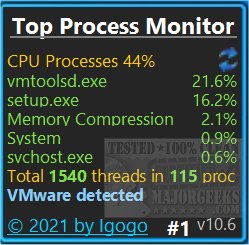
The recently released Top Process Monitor 11.6 is a sidebar gadget that provides users with real-time insights into their system's top processes. This tool allows users to monitor various metrics, including CPU usage, Memory (Working Set), and IO (Bytes read/written), enabling them to identify which processes are consuming the most resources. Users can interact with the gadget by clicking to cycle through different monitoring modes and can configure a double-click action to launch Task Manager, Resource Monitor, or Performance Monitor, among other options.
One of the standout features of Top Process Monitor is its customization capability, which allows users to set color identifiers for processes that are heavily utilizing memory, making it easier to spot potential issues at a glance. This gadget is particularly useful for individuals looking to optimize their system performance by keeping track of resource-intensive processes.
For those running Windows 8.1, 10, or similar versions who encounter installation issues, it may be necessary to use Desktop Gadgets Revived or a similar solution to enable the use of the Top Process Monitor effectively.
To enhance user experience further, the software comes with various related guidance resources, such as methods to identify processes or services on a computer, restoring or verifying default services across multiple Windows versions, customizing process information in Task Manager, and different ways to access Task Manager.
Overall, Top Process Monitor 11.6 serves as an essential tool for users seeking to maintain optimal system performance and monitor processes efficiently.
In addition to these features, future updates could include enhanced analytics capabilities, integration with cloud-based monitoring solutions, and support for additional operating systems, expanding its utility for a broader audience
One of the standout features of Top Process Monitor is its customization capability, which allows users to set color identifiers for processes that are heavily utilizing memory, making it easier to spot potential issues at a glance. This gadget is particularly useful for individuals looking to optimize their system performance by keeping track of resource-intensive processes.
For those running Windows 8.1, 10, or similar versions who encounter installation issues, it may be necessary to use Desktop Gadgets Revived or a similar solution to enable the use of the Top Process Monitor effectively.
To enhance user experience further, the software comes with various related guidance resources, such as methods to identify processes or services on a computer, restoring or verifying default services across multiple Windows versions, customizing process information in Task Manager, and different ways to access Task Manager.
Overall, Top Process Monitor 11.6 serves as an essential tool for users seeking to maintain optimal system performance and monitor processes efficiently.
In addition to these features, future updates could include enhanced analytics capabilities, integration with cloud-based monitoring solutions, and support for additional operating systems, expanding its utility for a broader audience
Top Process Monitor 11.6 released
Top Process Monitor is a sidebar gadget designed to show the top system processes.