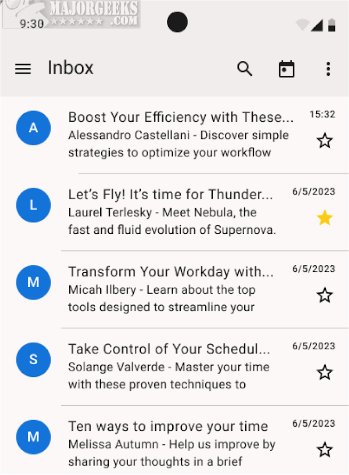
Thunderbird for Android 16.0 has been released, enabling users to access the comprehensive features of Thunderbird on their Android devices. This latest beta version allows for seamless email management and productivity tools, making it easier for users to stay connected and organized while on the go.
Key Functionalities
The app facilitates essential tasks such as setting up email accounts through both automatic and manual methods, reading and fetching messages, switching between accounts, organizing emails, and receiving timely notifications. Users can compose and send emails with ease, as well as perform basic email actions like replying, forwarding, and deleting messages. A noteworthy feature is the migration tool for K-9 Mail users, which allows for a smooth transition to Thunderbird for Android.
Favorite Features
Thunderbird for Android retains all the beloved features from the desktop version, including automatic account setup and advanced inbox organization. Users can easily set up accounts by entering their email address and password, with the option for manual configuration for more complex setups. The app also supports editing drafts and sending new emails directly from mobile devices.
Customization Options
Users can personalize their experience with light and dark themes and create customized email signatures. The unified inbox feature allows for easy access to emails from multiple accounts, while users can also enable or disable contact pictures and opt for a threaded view for better conversation tracking. Privacy is prioritized with an option to opt out of data collection.
Email Organization
Thunderbird for Android excels in email organization, enabling users to categorize messages into folders for easy retrieval. Push notifications keep users informed of incoming messages, ensuring they can respond promptly.
Overall, Thunderbird for Android 16.0 is a robust email management solution for Android users, offering a range of functionalities and customization options that align with their productivity needs. Try the latest beta version to explore these features firsthand!
Future Developments
As Thunderbird continues to evolve, future updates may introduce enhanced security features, further integrations with productivity tools, and improved user experience based on user feedback. Mozilla's commitment to maintaining privacy and security will likely remain a focal point as they expand the app's capabilities
Key Functionalities
The app facilitates essential tasks such as setting up email accounts through both automatic and manual methods, reading and fetching messages, switching between accounts, organizing emails, and receiving timely notifications. Users can compose and send emails with ease, as well as perform basic email actions like replying, forwarding, and deleting messages. A noteworthy feature is the migration tool for K-9 Mail users, which allows for a smooth transition to Thunderbird for Android.
Favorite Features
Thunderbird for Android retains all the beloved features from the desktop version, including automatic account setup and advanced inbox organization. Users can easily set up accounts by entering their email address and password, with the option for manual configuration for more complex setups. The app also supports editing drafts and sending new emails directly from mobile devices.
Customization Options
Users can personalize their experience with light and dark themes and create customized email signatures. The unified inbox feature allows for easy access to emails from multiple accounts, while users can also enable or disable contact pictures and opt for a threaded view for better conversation tracking. Privacy is prioritized with an option to opt out of data collection.
Email Organization
Thunderbird for Android excels in email organization, enabling users to categorize messages into folders for easy retrieval. Push notifications keep users informed of incoming messages, ensuring they can respond promptly.
Overall, Thunderbird for Android 16.0 is a robust email management solution for Android users, offering a range of functionalities and customization options that align with their productivity needs. Try the latest beta version to explore these features firsthand!
Future Developments
As Thunderbird continues to evolve, future updates may introduce enhanced security features, further integrations with productivity tools, and improved user experience based on user feedback. Mozilla's commitment to maintaining privacy and security will likely remain a focal point as they expand the app's capabilities
Thunderbird for Android 16.0 released
Thunderbird for Android allows you to access the full range of Thunderbird features on your Android device. Try out the latest beta.