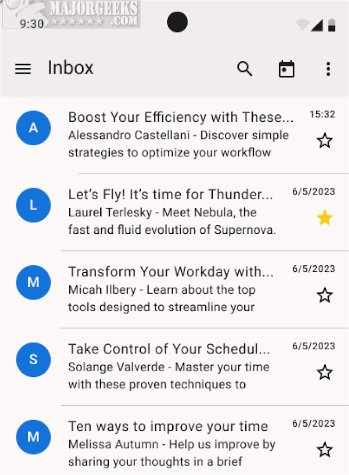
Thunderbird for Android 15.0 has been released, providing users with the full suite of Thunderbird features right on their mobile devices. This beta version allows users to experience powerful email management and productivity tools, making it convenient to stay connected and organized on the go.
Key Functionalities:
The app facilitates easy setup of email accounts through both automatic and manual methods, enabling users to read and fetch messages, switch between accounts smoothly, and organize their emails effectively. Notifications are sent promptly, and composing and sending emails is a straightforward process. For those transitioning from the K-9 Mail application, Thunderbird for Android includes a migration tool to simplify the shift.
Feature Highlights:
Users can enjoy several favorite features from the desktop version, including automatic account setup, advanced inbox organization, and push notifications. The app also supports both light and dark themes for interface customization and allows users to create personalized email signatures. A unified inbox feature lets users manage emails from multiple accounts in one location, with options to enable or disable contact pictures and threaded views for better conversation tracking.
Organizational Tools:
Thunderbird for Android excels in email organization, allowing users to categorize messages by moving them into different folders. Push notifications keep users updated on incoming messages, ensuring they can respond promptly to new correspondence.
Privacy Options:
For those concerned about privacy, users can opt out of data collection, ensuring their information remains secure.
Overall, Thunderbird for Android 15.0 aims to enhance email management on mobile devices, allowing users to maintain productivity and organization wherever they are. The beta version encourages users to try out the new offerings and provide feedback for further improvements.
Future Developments:
As Mozilla continues to refine Thunderbird for Android, we can anticipate additional features and enhancements based on user feedback. This could include further customization options, improved user interface designs, and enhanced security measures to ensure user privacy. With the growing reliance on mobile devices for communication, Thunderbird for Android is well-positioned to cater to the needs of its users in the evolving digital landscape
Key Functionalities:
The app facilitates easy setup of email accounts through both automatic and manual methods, enabling users to read and fetch messages, switch between accounts smoothly, and organize their emails effectively. Notifications are sent promptly, and composing and sending emails is a straightforward process. For those transitioning from the K-9 Mail application, Thunderbird for Android includes a migration tool to simplify the shift.
Feature Highlights:
Users can enjoy several favorite features from the desktop version, including automatic account setup, advanced inbox organization, and push notifications. The app also supports both light and dark themes for interface customization and allows users to create personalized email signatures. A unified inbox feature lets users manage emails from multiple accounts in one location, with options to enable or disable contact pictures and threaded views for better conversation tracking.
Organizational Tools:
Thunderbird for Android excels in email organization, allowing users to categorize messages by moving them into different folders. Push notifications keep users updated on incoming messages, ensuring they can respond promptly to new correspondence.
Privacy Options:
For those concerned about privacy, users can opt out of data collection, ensuring their information remains secure.
Overall, Thunderbird for Android 15.0 aims to enhance email management on mobile devices, allowing users to maintain productivity and organization wherever they are. The beta version encourages users to try out the new offerings and provide feedback for further improvements.
Future Developments:
As Mozilla continues to refine Thunderbird for Android, we can anticipate additional features and enhancements based on user feedback. This could include further customization options, improved user interface designs, and enhanced security measures to ensure user privacy. With the growing reliance on mobile devices for communication, Thunderbird for Android is well-positioned to cater to the needs of its users in the evolving digital landscape
Thunderbird for Android 15.0 released
Thunderbird for Android allows you to access the full range of Thunderbird features on your Android device. Try out the latest beta.