ThisIsMyFile is a versatile, portable utility designed to unlock or delete files that are protected or locked by other processes. This tool is particularly useful when users encounter error messages such as "cannot delete file: The file is used by another person or program" or "The action can't be completed because the file is open in xxx.exe - Close the file and try again."
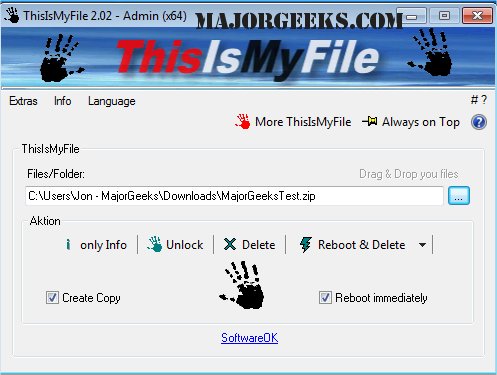
The utility focuses on resolving issues with locked files or folders, allowing users not only to unlock and delete them but also to identify the reasons behind the locking. Its user-friendly interface is minimalistic, featuring easy navigation, drag-and-drop functionality for files or folders, and options to terminate processes as needed.
Key Features of ThisIsMyFile:
- Create a copy of a locked file before deletion
- Unlock files without deleting
- Options for rebooting to delete files
- Reboot and delete without user confirmation
- Select specific files for action
- Flexible program parameters
- Support for multiple languages
Related Tools:
- Guides on taking full ownership of files and folders
- Instructions for adding a 'Secure Delete' option to the context menu across Windows versions (11, 10, 8, 7)
- Methods for protecting files and folders from accidental deletion
Extension:
In the latest version, ThisIsMyFile has further improved its functionality, ensuring better performance and compatibility with the latest Windows updates. Users are encouraged to explore the utility's advanced options for managing file permissions and processes effectively. Additionally, the software developers are committed to providing regular updates and user support, making it an essential tool for anyone needing to manage locked files efficiently
The utility focuses on resolving issues with locked files or folders, allowing users not only to unlock and delete them but also to identify the reasons behind the locking. Its user-friendly interface is minimalistic, featuring easy navigation, drag-and-drop functionality for files or folders, and options to terminate processes as needed.
Key Features of ThisIsMyFile:
- Create a copy of a locked file before deletion
- Unlock files without deleting
- Options for rebooting to delete files
- Reboot and delete without user confirmation
- Select specific files for action
- Flexible program parameters
- Support for multiple languages
Related Tools:
- Guides on taking full ownership of files and folders
- Instructions for adding a 'Secure Delete' option to the context menu across Windows versions (11, 10, 8, 7)
- Methods for protecting files and folders from accidental deletion
Extension:
In the latest version, ThisIsMyFile has further improved its functionality, ensuring better performance and compatibility with the latest Windows updates. Users are encouraged to explore the utility's advanced options for managing file permissions and processes effectively. Additionally, the software developers are committed to providing regular updates and user support, making it an essential tool for anyone needing to manage locked files efficiently
ThisIsMyFile 4.48 released
ThisIsMyFile is a portable utility that allows you to unlock/delete protected or locked files.