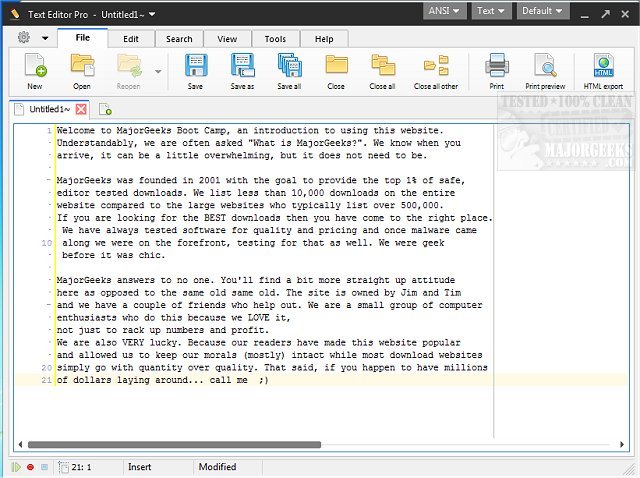
Text Editor Pro has just released version 35.2.0, enhancing its reputation as a robust text editing tool that previously operated under the name EditBone. This powerful application offers features such as syntax highlighting for multiple programming languages, making it ideal for developers working with languages like HTML, Python, and Ruby.
Key Features and Customization Options
Text Editor Pro stands out for its extensive customization options, providing users with over 100 settings and ready-made skins to personalize their editing environment. Additionally, it includes a Unicode character map, a numerical unit conversion tool, and SQL formatting capabilities. The software supports managing multiple directories and search results, which adds to its functionality.
User Interface and Usability
The dual-panel interface allows for a tailored experience where users can choose from single, double, or triple-column layouts. This feature is particularly advantageous for those juggling multiple projects, as it facilitates effortless navigation. The Directory function enables seamless file and folder management directly within the application.
Advanced Features for Enhanced Productivity
Text Editor Pro includes a Text Compare feature that highlights differences between two open documents, making it easy to track changes. Additionally, the Macro feature allows users to automate repetitive tasks by recording actions that can be replayed later, significantly improving efficiency.
Professional-Grade Solution
Text Editor Pro is not just a simple text editor; it is a comprehensive tool that integrates advanced functionalities such as numerical unit conversions and sophisticated formatting for various text types, including JSON, SQL, and XML. Its text and code folding features allow users to manage extensive documents with ease.
In conclusion, Text Editor Pro emerges as an essential tool for anyone involved in programming or extensive text editing, thanks to its rich feature set and customizable interface. Whether you are a novice or a seasoned developer, this software provides the necessary tools for an enhanced and productive editing experience.
Future Developments
As Text Editor Pro continues to evolve, users can expect ongoing updates that will further refine its capabilities and introduce new features, solidifying its position as a leader in the text editing software market
Key Features and Customization Options
Text Editor Pro stands out for its extensive customization options, providing users with over 100 settings and ready-made skins to personalize their editing environment. Additionally, it includes a Unicode character map, a numerical unit conversion tool, and SQL formatting capabilities. The software supports managing multiple directories and search results, which adds to its functionality.
User Interface and Usability
The dual-panel interface allows for a tailored experience where users can choose from single, double, or triple-column layouts. This feature is particularly advantageous for those juggling multiple projects, as it facilitates effortless navigation. The Directory function enables seamless file and folder management directly within the application.
Advanced Features for Enhanced Productivity
Text Editor Pro includes a Text Compare feature that highlights differences between two open documents, making it easy to track changes. Additionally, the Macro feature allows users to automate repetitive tasks by recording actions that can be replayed later, significantly improving efficiency.
Professional-Grade Solution
Text Editor Pro is not just a simple text editor; it is a comprehensive tool that integrates advanced functionalities such as numerical unit conversions and sophisticated formatting for various text types, including JSON, SQL, and XML. Its text and code folding features allow users to manage extensive documents with ease.
In conclusion, Text Editor Pro emerges as an essential tool for anyone involved in programming or extensive text editing, thanks to its rich feature set and customizable interface. Whether you are a novice or a seasoned developer, this software provides the necessary tools for an enhanced and productive editing experience.
Future Developments
As Text Editor Pro continues to evolve, users can expect ongoing updates that will further refine its capabilities and introduce new features, solidifying its position as a leader in the text editing software market
Text Editor Pro 35.2.0 released
Text Editor Pro (formerly EditBone) is a powerful text editing tool with syntax highlighting multiple languages and scripts.