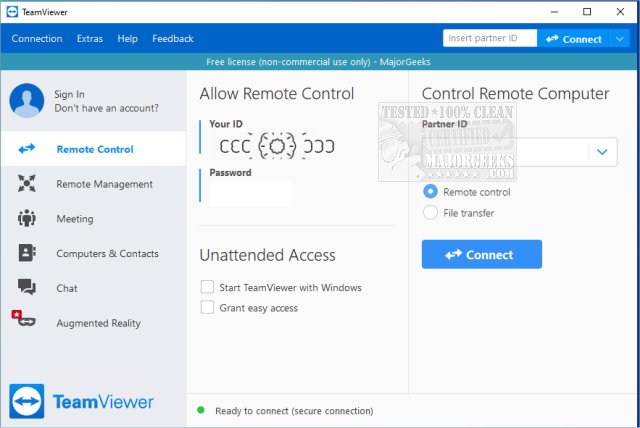
TeamViewer has released version 15.74.6 of its popular remote access software, which is known for being user-friendly and available for free for non-commercial use. The application allows users to remotely access or provide access to their computers from anywhere, supporting multiple operating systems, including Windows, macOS, Linux, Android, and iOS. One notable feature is that it can be run as a portable application, eliminating the need for installation.
The app is particularly useful for troubleshooting and IT assistance, making it easier to guide someone through technical issues without being physically present. TeamViewer generates a unique 9-digit ID and a session-specific password for each connection, enhancing security by ensuring the password changes with each session. Users can take control of the remote computer to view screens, move the mouse, install applications, and resolve issues as if they were sitting in front of the device.
TeamViewer is ideal for helping friends or clients with software installations, fixing technical problems remotely, or accessing a home PC while traveling. It also supports two-way assistance, allowing users to share their desktops during collaborative projects or presentations. The software uses AES (256-bit) encryption for secure connections, ensuring that sensitive information remains protected.
The application offers both installed and portable versions, with the portable option being convenient for users who require quick, temporary access without installation or administrative rights.
Pros and Cons:
Pros:
- Free for personal use
- Portable version available
- Supports file transfers, chat, and multi-monitor setups
- End-to-end encrypted connections
- Compatible with all major platforms
Cons:
- Commercial usage prompts license notifications and restrictions
- Some features, like remote printing, require the full installation
Geek Verdict:
TeamViewer strikes a balance between functionality and ease of use, making it a go-to tool for remote tech support. It's fast, reliable, and secure, often used daily for maintaining family PCs and addressing technical issues without the need for physical travel.
Extension:
As remote work and digital collaboration continue to grow, TeamViewer remains relevant by adapting to user needs. The software is not only beneficial for personal use but also supports small businesses seeking efficient remote support solutions. Additionally, with its encrypted connections, TeamViewer assures users that sensitive data remains protected during remote sessions. Future updates may include enhancements in user interface design, more robust features for business applications, and expanded compatibility with emerging technologies. Overall, TeamViewer is poised to remain a leading tool in the realm of remote access solutions
The app is particularly useful for troubleshooting and IT assistance, making it easier to guide someone through technical issues without being physically present. TeamViewer generates a unique 9-digit ID and a session-specific password for each connection, enhancing security by ensuring the password changes with each session. Users can take control of the remote computer to view screens, move the mouse, install applications, and resolve issues as if they were sitting in front of the device.
TeamViewer is ideal for helping friends or clients with software installations, fixing technical problems remotely, or accessing a home PC while traveling. It also supports two-way assistance, allowing users to share their desktops during collaborative projects or presentations. The software uses AES (256-bit) encryption for secure connections, ensuring that sensitive information remains protected.
The application offers both installed and portable versions, with the portable option being convenient for users who require quick, temporary access without installation or administrative rights.
Pros and Cons:
Pros:
- Free for personal use
- Portable version available
- Supports file transfers, chat, and multi-monitor setups
- End-to-end encrypted connections
- Compatible with all major platforms
Cons:
- Commercial usage prompts license notifications and restrictions
- Some features, like remote printing, require the full installation
Geek Verdict:
TeamViewer strikes a balance between functionality and ease of use, making it a go-to tool for remote tech support. It's fast, reliable, and secure, often used daily for maintaining family PCs and addressing technical issues without the need for physical travel.
Extension:
As remote work and digital collaboration continue to grow, TeamViewer remains relevant by adapting to user needs. The software is not only beneficial for personal use but also supports small businesses seeking efficient remote support solutions. Additionally, with its encrypted connections, TeamViewer assures users that sensitive data remains protected during remote sessions. Future updates may include enhancements in user interface design, more robust features for business applications, and expanded compatibility with emerging technologies. Overall, TeamViewer is poised to remain a leading tool in the realm of remote access solutions
TeamViewer 15.74.6 released
TeamViewer is a popular, easy-to-use free remote access program to access or let someone remotely access your computer. It can be installed or run as portable. Video tutorial available.