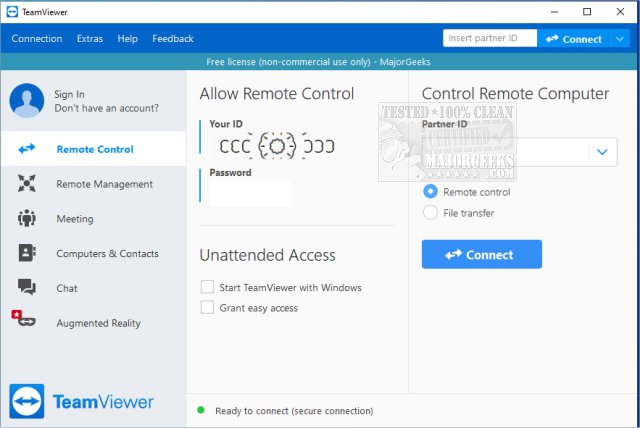
TeamViewer is a widely recognized remote access program that simplifies the process of connecting to another computer over the internet. Whether you need to help a friend troubleshoot a tech issue or access your own device while traveling, TeamViewer provides an efficient solution. The latest version, TeamViewer 15.73.3, maintains its reputation as a user-friendly platform, available for free for non-commercial use.
Cross-Platform Compatibility: TeamViewer operates seamlessly across various operating systems, including Windows, macOS, Linux, Android, and iOS. Users can also opt for a portable version that doesn’t require installation, making it convenient for one-time assistance.
Simple Setup: The application generates a unique 9-digit ID and a session-specific password for secure access. This password changes with each session, ensuring that only authorized users can connect, unless configured for unattended access.
User-Friendly Interface: Even those with minimal technical knowledge can easily navigate TeamViewer. The straightforward interface enables users to connect quickly, enabling remote support and troubleshooting.
Two-Way Support: TeamViewer is not just a tool for fixing issues; it also allows users to share their screens, making it perfect for collaborative projects, presentations, or demonstrations.
Security and Performance: All connections are encrypted using AES (256-bit), ensuring that sensitive information remains protected. Users have noted that TeamViewer performs well even on slower internet connections, providing fast and reliable screen updates.
- Assisting friends or clients with software installations
- Remotely troubleshooting technical issues
- Accessing personal computers while traveling
Pros:
- Free for personal use
- Portable version available without installation
- Supports file transfers, chat, and multi-monitor setups
- End-to-end encrypted connections
- Compatible with all major platforms
Cons:
- Frequent commercial use may lead to license pop-ups and restrictions
- Some advanced features, like remote printing, require installation of the full application
TeamViewer strikes a balance between functionality and ease of use, making it a go-to choice for tech support. Whether you’re helping family members or managing files remotely, this tool stands out for its speed, security, and reliability. With the convenience of a portable version and robust features, TeamViewer remains an essential tool for both casual users and IT professionals alike.
As technology evolves, TeamViewer may look to further enhance its features, possibly integrating more advanced functionalities like AI-driven support or improved collaboration tools. Users can anticipate ongoing improvements that align with the increasing demand for remote assistance solutions in a digital-first world
Key Features and Benefits
Cross-Platform Compatibility: TeamViewer operates seamlessly across various operating systems, including Windows, macOS, Linux, Android, and iOS. Users can also opt for a portable version that doesn’t require installation, making it convenient for one-time assistance.
Simple Setup: The application generates a unique 9-digit ID and a session-specific password for secure access. This password changes with each session, ensuring that only authorized users can connect, unless configured for unattended access.
User-Friendly Interface: Even those with minimal technical knowledge can easily navigate TeamViewer. The straightforward interface enables users to connect quickly, enabling remote support and troubleshooting.
Two-Way Support: TeamViewer is not just a tool for fixing issues; it also allows users to share their screens, making it perfect for collaborative projects, presentations, or demonstrations.
Security and Performance: All connections are encrypted using AES (256-bit), ensuring that sensitive information remains protected. Users have noted that TeamViewer performs well even on slower internet connections, providing fast and reliable screen updates.
Ideal Use Cases
- Assisting friends or clients with software installations
- Remotely troubleshooting technical issues
- Accessing personal computers while traveling
Pros and Cons
Pros:
- Free for personal use
- Portable version available without installation
- Supports file transfers, chat, and multi-monitor setups
- End-to-end encrypted connections
- Compatible with all major platforms
Cons:
- Frequent commercial use may lead to license pop-ups and restrictions
- Some advanced features, like remote printing, require installation of the full application
Conclusion
TeamViewer strikes a balance between functionality and ease of use, making it a go-to choice for tech support. Whether you’re helping family members or managing files remotely, this tool stands out for its speed, security, and reliability. With the convenience of a portable version and robust features, TeamViewer remains an essential tool for both casual users and IT professionals alike.
Future Considerations
As technology evolves, TeamViewer may look to further enhance its features, possibly integrating more advanced functionalities like AI-driven support or improved collaboration tools. Users can anticipate ongoing improvements that align with the increasing demand for remote assistance solutions in a digital-first world
TeamViewer 15.73.3 released
TeamViewer is a popular, easy-to-use free remote access program to access or let someone remotely access your computer. It can be installed or run as portable. Video tutorial available.