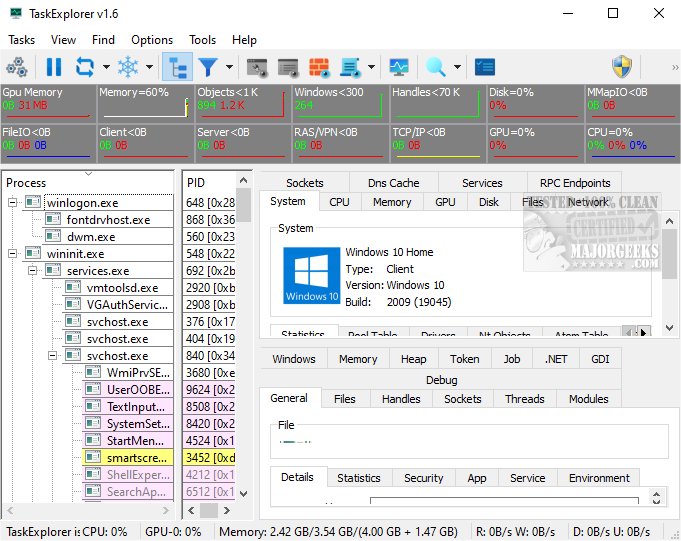
TaskExplorer is an advanced task management tool specifically designed to track the performance of running applications and provide comprehensive insights into their operations. This functionality empowers users to understand how applications function and the resources they consume.
Overview of TaskExplorer
TaskExplorer stands out due to its meticulous user interface, which emphasizes speed and efficiency. It allows users to access real-time data effortlessly, avoiding overwhelming them with multiple windows. Instead, information is presented through intuitive, easy-to-navigate panels that enhance usability. When a process is selected, detailed information is displayed in the lower half of the screen, providing a clear view of relevant data. Users can easily navigate between processes using arrow keys, which aids in effective analysis and comparison.
For users needing to view details of multiple processes at once, double-clicking a process opens its Task Info Panel in a separate window. TaskExplorer also boasts robust system monitoring capabilities, featuring toolbar graphs that illustrate real-time resource usage, such as CPU, handles, network traffic, and disk access. System Info Panels provide insight into all open files and sockets, allowing users to manage system services and drivers effectively. Dedicated performance panels for CPU, Memory, Disk I/O, Network, and GPU resources present detailed graphs, simplifying performance monitoring and optimization.
Dynamic Refreshing for Real-Time Insights
One of the standout features of TaskExplorer is its dynamic data refreshing capability, which allows users to observe real-time changes in system performance. This immediate visibility into fluctuations helps users quickly identify issues and understand overall system behavior, facilitating informed decision-making.
Advanced Features for Enhanced Monitoring
TaskExplorer is equipped with several advanced features that improve visibility into system processes. The Thread Panel offers a detailed stack trace for the selected thread, valuable for diagnosing deadlocks and performance bottlenecks. The Memory Panel allows users to view and modify process memory through an advanced memory editor with string search functionalities, enhancing understanding of memory usage.
Additionally, the Handles Panel displays all open handles, providing critical information such as file names, current positions, and sizes. This level of detail offers a comprehensive overview of the disk operations a program is executing, which aids in monitoring and managing system performance.
Conclusion: A Valuable Utility for System Performance Insight
In summary, TaskExplorer is a powerful and user-friendly utility that provides in-depth insights into system performance. With its continuous real-time updates, users can delve into data complexities and uncover the root causes of crashes, freezes, and other frustrating performance issues. Experience seamless exploration and take control of your system’s health like never before!
Future Enhancements
Looking ahead, further enhancements could include integrating machine learning algorithms to predict potential performance issues before they occur and expanding compatibility with more operating systems. Additionally, incorporating user feedback mechanisms could help refine the user experience and ensure TaskExplorer meets the evolving needs of its users
Overview of TaskExplorer
TaskExplorer stands out due to its meticulous user interface, which emphasizes speed and efficiency. It allows users to access real-time data effortlessly, avoiding overwhelming them with multiple windows. Instead, information is presented through intuitive, easy-to-navigate panels that enhance usability. When a process is selected, detailed information is displayed in the lower half of the screen, providing a clear view of relevant data. Users can easily navigate between processes using arrow keys, which aids in effective analysis and comparison.
For users needing to view details of multiple processes at once, double-clicking a process opens its Task Info Panel in a separate window. TaskExplorer also boasts robust system monitoring capabilities, featuring toolbar graphs that illustrate real-time resource usage, such as CPU, handles, network traffic, and disk access. System Info Panels provide insight into all open files and sockets, allowing users to manage system services and drivers effectively. Dedicated performance panels for CPU, Memory, Disk I/O, Network, and GPU resources present detailed graphs, simplifying performance monitoring and optimization.
Dynamic Refreshing for Real-Time Insights
One of the standout features of TaskExplorer is its dynamic data refreshing capability, which allows users to observe real-time changes in system performance. This immediate visibility into fluctuations helps users quickly identify issues and understand overall system behavior, facilitating informed decision-making.
Advanced Features for Enhanced Monitoring
TaskExplorer is equipped with several advanced features that improve visibility into system processes. The Thread Panel offers a detailed stack trace for the selected thread, valuable for diagnosing deadlocks and performance bottlenecks. The Memory Panel allows users to view and modify process memory through an advanced memory editor with string search functionalities, enhancing understanding of memory usage.
Additionally, the Handles Panel displays all open handles, providing critical information such as file names, current positions, and sizes. This level of detail offers a comprehensive overview of the disk operations a program is executing, which aids in monitoring and managing system performance.
Conclusion: A Valuable Utility for System Performance Insight
In summary, TaskExplorer is a powerful and user-friendly utility that provides in-depth insights into system performance. With its continuous real-time updates, users can delve into data complexities and uncover the root causes of crashes, freezes, and other frustrating performance issues. Experience seamless exploration and take control of your system’s health like never before!
Future Enhancements
Looking ahead, further enhancements could include integrating machine learning algorithms to predict potential performance issues before they occur and expanding compatibility with more operating systems. Additionally, incorporating user feedback mechanisms could help refine the user experience and ensure TaskExplorer meets the evolving needs of its users
TaskExplorer 1.7.1 released
TaskExplorer is an advanced task management tool that tracks the performance of running applications and offers comprehensive insights into their activities. This enables users to understand how applications operate and the resources they utilize.