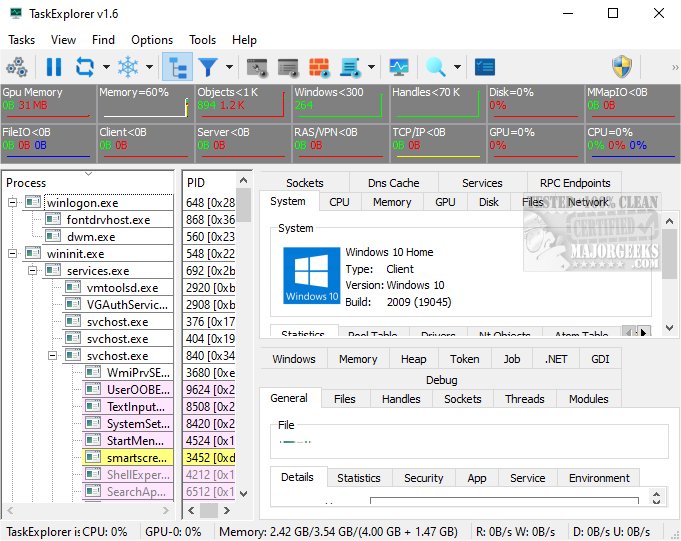
TaskExplorer 1.7.0 has been launched, providing an advanced task management solution that monitors the performance of active applications and delivers detailed insights into their operations. This tool enables users to comprehend how applications function and the resources they consume.
What is TaskExplorer?
TaskExplorer is designed to facilitate efficient task management by offering real-time performance tracking of applications. Its user interface emphasizes speed and usability, presenting information through straightforward panels rather than cluttered windows. This design helps users access critical data with minimal effort. When selecting a process, detailed information is shown in the lower section of the screen, allowing for easy navigation and comparative analysis of multiple processes.
Users can also double-click on a process to open a Task Info Panel in a new window, providing further details. TaskExplorer includes robust system monitoring features, with visual graphs displaying real-time resource usage, such as CPU, memory, network traffic, and disk activity. Additionally, users can manage system services, including drivers, and access dedicated performance panels for various resources.
Dynamic Refreshing for Real-Time Insights
One of the standout features of TaskExplorer is its dynamic data refreshing capability, which allows users to see real-time changes in system performance. This functionality aids in quickly identifying performance fluctuations and gaining a deeper understanding of system behavior, thus enabling informed decision-making.
Advanced Features for Enhanced Visibility
TaskExplorer boasts multiple advanced features that improve visibility into system processes. The Thread Panel provides a detailed stack trace for the selected thread, helping to identify issues like deadlocks and performance bottlenecks. The Memory Panel allows users to view and edit process memory with advanced search functionalities, enhancing the understanding of memory consumption. The Handles Panel reveals all open handles with essential details, offering a comprehensive overview of a program’s disk operations.
In Conclusion: A Powerful Tool for Performance Insights
TaskExplorer is a user-friendly and robust utility that delivers valuable insights into system performance. With continuous real-time updates, users can explore the complex dynamics of their systems, helping to identify the root causes of issues like crashes and slowdowns. This tool empowers users to effectively manage their systems, enhancing productivity and clarity in process management.
Future Extensions:
In future updates, TaskExplorer could incorporate AI-driven analytics to predict system performance issues before they occur, offer customizable alerts for resource thresholds, and provide enhanced reporting features for users looking to optimize their workflows. Additionally, integrating cloud storage capabilities could allow users to save and share their monitoring sessions for collaborative troubleshooting and performance analysis
What is TaskExplorer?
TaskExplorer is designed to facilitate efficient task management by offering real-time performance tracking of applications. Its user interface emphasizes speed and usability, presenting information through straightforward panels rather than cluttered windows. This design helps users access critical data with minimal effort. When selecting a process, detailed information is shown in the lower section of the screen, allowing for easy navigation and comparative analysis of multiple processes.
Users can also double-click on a process to open a Task Info Panel in a new window, providing further details. TaskExplorer includes robust system monitoring features, with visual graphs displaying real-time resource usage, such as CPU, memory, network traffic, and disk activity. Additionally, users can manage system services, including drivers, and access dedicated performance panels for various resources.
Dynamic Refreshing for Real-Time Insights
One of the standout features of TaskExplorer is its dynamic data refreshing capability, which allows users to see real-time changes in system performance. This functionality aids in quickly identifying performance fluctuations and gaining a deeper understanding of system behavior, thus enabling informed decision-making.
Advanced Features for Enhanced Visibility
TaskExplorer boasts multiple advanced features that improve visibility into system processes. The Thread Panel provides a detailed stack trace for the selected thread, helping to identify issues like deadlocks and performance bottlenecks. The Memory Panel allows users to view and edit process memory with advanced search functionalities, enhancing the understanding of memory consumption. The Handles Panel reveals all open handles with essential details, offering a comprehensive overview of a program’s disk operations.
In Conclusion: A Powerful Tool for Performance Insights
TaskExplorer is a user-friendly and robust utility that delivers valuable insights into system performance. With continuous real-time updates, users can explore the complex dynamics of their systems, helping to identify the root causes of issues like crashes and slowdowns. This tool empowers users to effectively manage their systems, enhancing productivity and clarity in process management.
Future Extensions:
In future updates, TaskExplorer could incorporate AI-driven analytics to predict system performance issues before they occur, offer customizable alerts for resource thresholds, and provide enhanced reporting features for users looking to optimize their workflows. Additionally, integrating cloud storage capabilities could allow users to save and share their monitoring sessions for collaborative troubleshooting and performance analysis
TaskExplorer 1.7.0 released
TaskExplorer is an advanced task management tool that tracks the performance of running applications and offers comprehensive insights into their activities. This enables users to understand how applications operate and the resources they utilize.