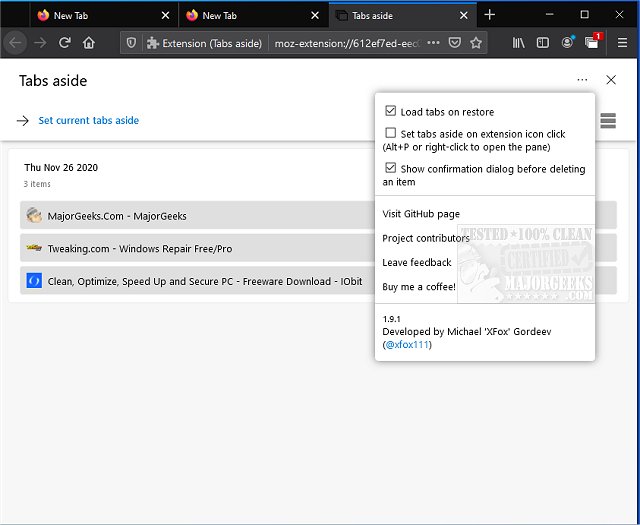
The latest release of Tabs Aside for Chrome, Firefox, and Edge (version 3.3.0) enhances users' ability to manage their browsing experience by allowing them to save tabs for later use. This feature is particularly useful for users who accumulate numerous tabs that are not significant enough to warrant saving as bookmarks. Inspired by the now-discontinued Tabs Aside feature in the original Microsoft Edge, this extension provides an efficient way to temporarily set aside tabs and revisit them easily.
One important aspect for users to remember is that if they configure Tabs Aside to set tabs aside with a click on the extension icon, they will need to use the keyboard shortcut Alt + P or right-click to access the saved tabs pane. During testing, this could lead to confusion if users forget this step, leaving them unable to access their set-aside tabs.
Key features of Tabs Aside include:
- An intuitive user interface that builds on the legacy Microsoft Edge design with improvements.
- An auto dark mode for enhanced usability in low-light environments.
- The ability to restore individual tabs from the saved collection without needing to remove others.
- Convenient hotkeys for quick navigation.
- The option to load restored tabs on demand.
In addition to these features, users may find it beneficial to explore related functionalities such as muting tabs in major browsers or restoring accidentally closed tabs, further enhancing their browsing efficiency.
As the web continues to evolve, tools like Tabs Aside remain essential for users who want to streamline their online activities, ensuring that they can manage their browsing experience effectively without the clutter of excessive tabs or the need for extensive bookmarking
One important aspect for users to remember is that if they configure Tabs Aside to set tabs aside with a click on the extension icon, they will need to use the keyboard shortcut Alt + P or right-click to access the saved tabs pane. During testing, this could lead to confusion if users forget this step, leaving them unable to access their set-aside tabs.
Key features of Tabs Aside include:
- An intuitive user interface that builds on the legacy Microsoft Edge design with improvements.
- An auto dark mode for enhanced usability in low-light environments.
- The ability to restore individual tabs from the saved collection without needing to remove others.
- Convenient hotkeys for quick navigation.
- The option to load restored tabs on demand.
In addition to these features, users may find it beneficial to explore related functionalities such as muting tabs in major browsers or restoring accidentally closed tabs, further enhancing their browsing efficiency.
As the web continues to evolve, tools like Tabs Aside remain essential for users who want to streamline their online activities, ensuring that they can manage their browsing experience effectively without the clutter of excessive tabs or the need for extensive bookmarking
Tabs Aside for Chrome, Firefox, and Edge 3.3.0 released
Tabs Aside for Chrome, Firefox, and Edge allows you to save tabs for later use.
Tabs Aside for Chrome, Firefox, and Edge 3.3.0 released @ MajorGeeks