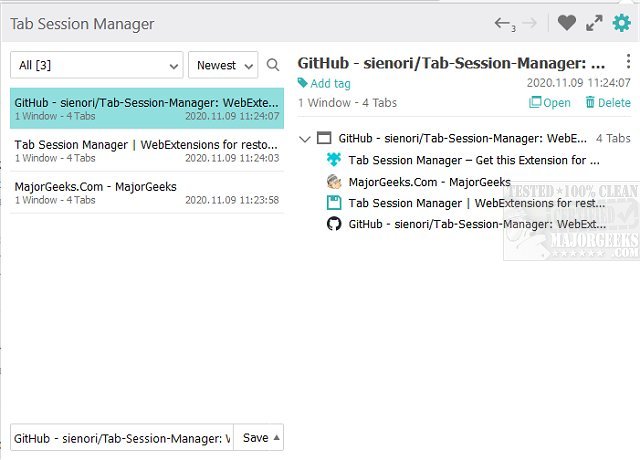
The latest version 7.2.0 of Tab Session Manager has been released for Chrome, Firefox, and Edge, providing an essential tool for users who juggle multiple tabs. This extension allows users to save and restore the state of their browser windows and tabs, effectively preventing the potential loss of work when tabs are accidentally closed.
With Tab Session Manager, you can manually or automatically save your open tabs, ensuring that your work remains accessible even if you close your browser. The extension offers numerous features, such as user-defined keyboard shortcuts, session export for backup, session priority settings, and more, making it an invaluable resource for anyone who frequently works with multiple tabs.
Key features of Tab Session Manager include:
- The ability to save and restore windows and tabs
- Session management with customizable names and tags
- Autosave functionality when a window is closed or at regular intervals
- Import and export capabilities for sessions
- Compatibility with Chrome extensions
- Cloud syncing for easy access across devices
In addition to these features, users may find it beneficial to explore similar tools and guides, such as methods for muting tabs in various browsers, restoring accidentally closed tabs, and enabling close-all-tabs warnings in Microsoft Edge.
In conclusion, Tab Session Manager is an indispensable tool for anyone looking to enhance their browsing experience by managing and protecting their open tabs, thereby minimizing the risk of losing important data. Whether you're a casual user or a professional who relies heavily on browser tabs, this extension can significantly improve your workflow
With Tab Session Manager, you can manually or automatically save your open tabs, ensuring that your work remains accessible even if you close your browser. The extension offers numerous features, such as user-defined keyboard shortcuts, session export for backup, session priority settings, and more, making it an invaluable resource for anyone who frequently works with multiple tabs.
Key features of Tab Session Manager include:
- The ability to save and restore windows and tabs
- Session management with customizable names and tags
- Autosave functionality when a window is closed or at regular intervals
- Import and export capabilities for sessions
- Compatibility with Chrome extensions
- Cloud syncing for easy access across devices
In addition to these features, users may find it beneficial to explore similar tools and guides, such as methods for muting tabs in various browsers, restoring accidentally closed tabs, and enabling close-all-tabs warnings in Microsoft Edge.
In conclusion, Tab Session Manager is an indispensable tool for anyone looking to enhance their browsing experience by managing and protecting their open tabs, thereby minimizing the risk of losing important data. Whether you're a casual user or a professional who relies heavily on browser tabs, this extension can significantly improve your workflow
Tab Session Manager for Chrome, Firefox, and Edge 7.2.0 released
Tab Session Manager for Chrome, Firefox, and Edge will save/restore the state of your windows and tabs.
Tab Session Manager for Chrome, Firefox, and Edge 7.2.0 released @ MajorGeeks