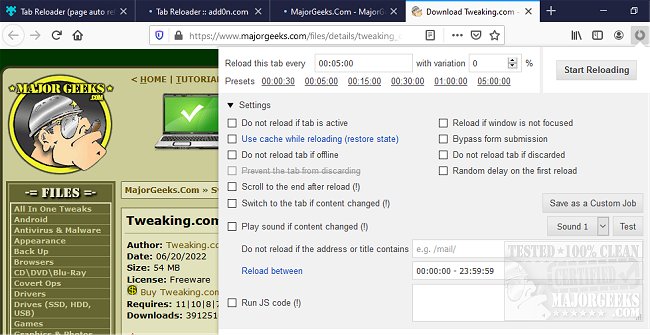
The recently released version 0.6.7 of Tab Reloader for Chrome, Firefox, Edge, and Opera provides users with enhanced capabilities for automatically reloading browser tabs based on customizable time settings. This versatile add-on caters to users who manage multiple tabs and require a streamlined way to refresh content periodically.
Key features of Tab Reloader include the ability to set variable reloading times with random intervals, control whether reloading happens for active tabs, and restore reloading tasks after a browser restart. Users can conveniently access reloading options through a toolbar panel, allowing for continuous tab management. Other functionalities include reloading from the context menu, displaying countdowns for upcoming reloads, and generating custom rules based on URL or hostname.
Moreover, Tab Reloader supports advanced features such as reloading local files, selectively skipping form submissions, and executing custom JavaScript on reloads. Users can opt to reload tabs a specific number of times before halting or reload discarded tabs across various windows.
Overall, Tab Reloader is an essential tool for users who require efficient tab management, providing a wide range of customizable options to enhance their browsing experience.
In future updates, adding features such as improved analytics for tracking tab activity, integration with productivity tools, or enhanced user interface designs could further elevate the user experience. Additionally, incorporating user feedback mechanisms may help developers refine the extension based on real-world usage patterns
Key features of Tab Reloader include the ability to set variable reloading times with random intervals, control whether reloading happens for active tabs, and restore reloading tasks after a browser restart. Users can conveniently access reloading options through a toolbar panel, allowing for continuous tab management. Other functionalities include reloading from the context menu, displaying countdowns for upcoming reloads, and generating custom rules based on URL or hostname.
Moreover, Tab Reloader supports advanced features such as reloading local files, selectively skipping form submissions, and executing custom JavaScript on reloads. Users can opt to reload tabs a specific number of times before halting or reload discarded tabs across various windows.
Overall, Tab Reloader is an essential tool for users who require efficient tab management, providing a wide range of customizable options to enhance their browsing experience.
In future updates, adding features such as improved analytics for tracking tab activity, integration with productivity tools, or enhanced user interface designs could further elevate the user experience. Additionally, incorporating user feedback mechanisms may help developers refine the extension based on real-world usage patterns
Tab Reloader for Chrome, Firefox, Edge, and Opera 0.6.7 released
Tab Reloader for Chrome, Firefox, Edge, and Opera allows the reloading of browser tabs within a user-defined time frame.
Tab Reloader for Chrome, Firefox, Edge, and Opera 0.6.7 released @ MajorGeeks