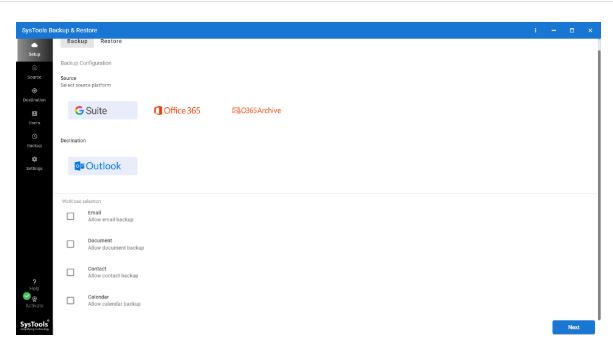
SysTools has released version 7.7.0 of its Backup and Restore utility, designed to provide an intuitive and efficient solution for creating and restoring backups on Windows systems. This tool is suitable for a wide range of users, from home users wanting to protect personal files, to IT professionals overseeing extensive corporate data. It emphasizes ease of use, allowing users to back up important data without getting bogged down by complex settings.
With SysTools Backup & Restore, users can safeguard critical information such as family photos, financial records, and software installations. Small business owners can protect essential documents like invoices and client files, while IT administrators can streamline the backup process for multiple user profiles and shared drives. The software is particularly valuable in emergencies, providing a recovery plan that prevents data loss from incidents like system crashes or ransomware attacks.
The application features a clean interface that simplifies the backup process. Users can create full backups of files, folders, or entire drives with just a few clicks, and can choose to save backups locally, on external drives, or across a network. Restoration is equally straightforward, allowing users to select specific files or folders to recover, which is a significant time-saver compared to restoring an entire backup.
Key features include:
- Full and Incremental Backups: Users can choose to perform full backups or incremental backups that save only changed data.
- Selective Restore: Users can recover specific files or folders without restoring everything.
- User Profile Backup: Administrators can quickly back up Windows user profiles.
- Multiple Storage Options: Backups can be saved to local drives, external media, or network drives.
- Smart Logging: The software maintains detailed logs of backup and restore activities.
Pros of SysTools Backup & Restore include its simple setup, user-friendly interface, support for both full and incremental backups, and selective restore functionality. It is particularly beneficial for small businesses and IT administrators.
Cons include a lack of native cloud storage integration, meaning backups must be saved to local or network drives. Some advanced features are available only in the paid version, and the interface may appear somewhat outdated to users looking for a more modern design.
In conclusion, SysTools Backup & Restore is a practical and efficient tool for anyone needing reliable backup solutions on Windows. It is especially suitable for small businesses and IT teams that require a straightforward method for managing backups and restorations without unnecessary complications. While it may not have an array of advanced features or a modern aesthetic, its effectiveness in performing essential backup tasks makes it a valuable asset for data protection
With SysTools Backup & Restore, users can safeguard critical information such as family photos, financial records, and software installations. Small business owners can protect essential documents like invoices and client files, while IT administrators can streamline the backup process for multiple user profiles and shared drives. The software is particularly valuable in emergencies, providing a recovery plan that prevents data loss from incidents like system crashes or ransomware attacks.
The application features a clean interface that simplifies the backup process. Users can create full backups of files, folders, or entire drives with just a few clicks, and can choose to save backups locally, on external drives, or across a network. Restoration is equally straightforward, allowing users to select specific files or folders to recover, which is a significant time-saver compared to restoring an entire backup.
Key features include:
- Full and Incremental Backups: Users can choose to perform full backups or incremental backups that save only changed data.
- Selective Restore: Users can recover specific files or folders without restoring everything.
- User Profile Backup: Administrators can quickly back up Windows user profiles.
- Multiple Storage Options: Backups can be saved to local drives, external media, or network drives.
- Smart Logging: The software maintains detailed logs of backup and restore activities.
Pros of SysTools Backup & Restore include its simple setup, user-friendly interface, support for both full and incremental backups, and selective restore functionality. It is particularly beneficial for small businesses and IT administrators.
Cons include a lack of native cloud storage integration, meaning backups must be saved to local or network drives. Some advanced features are available only in the paid version, and the interface may appear somewhat outdated to users looking for a more modern design.
In conclusion, SysTools Backup & Restore is a practical and efficient tool for anyone needing reliable backup solutions on Windows. It is especially suitable for small businesses and IT teams that require a straightforward method for managing backups and restorations without unnecessary complications. While it may not have an array of advanced features or a modern aesthetic, its effectiveness in performing essential backup tasks makes it a valuable asset for data protection
SysTools Backup and Restore 7.7.0 released
SysTools Backup & Restore is a user-friendly utility that lets you create and restore backups easily for anyone working with Windows systems.