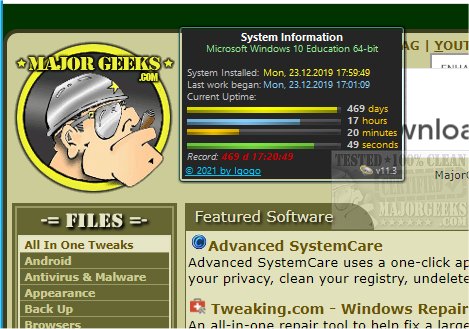
System Uptime Full Plus 13.2 has been released, offering users a convenient gadget for monitoring their system's uptime. This tool provides essential information such as the operating system installation time, the last boot time, and additional uptime statistics. It is particularly beneficial for IT professionals and any users interested in tracking their computer's activity over time.
To utilize System Uptime Full Plus, users may need to install Desktop Gadgets Revived or a similar application, as it enhances compatibility with the Windows environment. This gadget efficiently aggregates and presents uptime data directly from a Windows 10 machine, which can otherwise be cumbersome to extract manually. Notably, it does so with minimal impact on system performance.
In addition to uptime details, the gadget displays information about the operating system platform and architecture. Users can choose from three display modes—full, small, and wide—with the option to customize the background, title, system information, days, numbers, and units to fit their preferences. With its user-friendly interface, System Uptime Full Plus allows users to quickly glance at their uptime details without hassle.
For those interested in similar topics, the text also references various guides on shutting down or restarting a PC via PowerShell or Command Prompt, altering default shutdown settings, and identifying computer hardware.
In summary, System Uptime Full Plus 13.2 is a powerful and flexible tool for monitoring system uptime, making it easier for users to access critical performance metrics while enhancing their overall computing experience. This release reaffirms the importance of having reliable monitoring tools for both casual users and IT professionals alike
To utilize System Uptime Full Plus, users may need to install Desktop Gadgets Revived or a similar application, as it enhances compatibility with the Windows environment. This gadget efficiently aggregates and presents uptime data directly from a Windows 10 machine, which can otherwise be cumbersome to extract manually. Notably, it does so with minimal impact on system performance.
In addition to uptime details, the gadget displays information about the operating system platform and architecture. Users can choose from three display modes—full, small, and wide—with the option to customize the background, title, system information, days, numbers, and units to fit their preferences. With its user-friendly interface, System Uptime Full Plus allows users to quickly glance at their uptime details without hassle.
For those interested in similar topics, the text also references various guides on shutting down or restarting a PC via PowerShell or Command Prompt, altering default shutdown settings, and identifying computer hardware.
In summary, System Uptime Full Plus 13.2 is a powerful and flexible tool for monitoring system uptime, making it easier for users to access critical performance metrics while enhancing their overall computing experience. This release reaffirms the importance of having reliable monitoring tools for both casual users and IT professionals alike
System Uptime Full Plus 13.2 released
System Uptime Full Plus is a gadget that provides details about your system's uptime, including OS install time, last boot, and more.