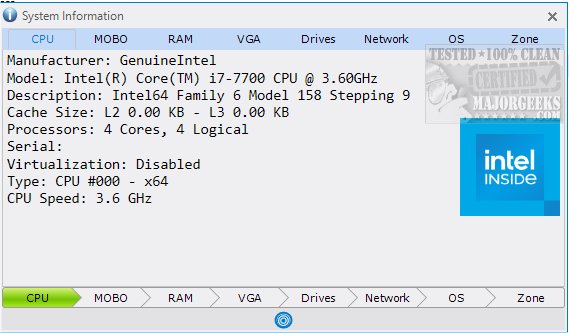
System Information 18.48 has been released as a user-friendly, portable tool designed for retrieving comprehensive system insights through a single graphical user interface (GUI). Unlike more complex alternatives such as HWiNFO, System Information excels in its simplicity and ease of access. It serves as an excellent resource for users looking to gather essential details about their computer's hardware specifications, operating systems, and network configurations.
User-Friendly Interface
The interface of System Information is intuitively organized, making it easy to navigate. Key areas of interest, including CPU, motherboard, RAM, graphics card, and network details, are conveniently located at the bottom for quick access. Users can click on specific components to reveal detailed information.
Data Management Options
In addition to viewing system information, users can manage their data effectively through a simple menu that appears when clicking the blue button on the interface. This menu allows options to print, copy, save, or refresh the displayed information, catering to various user needs.
Centralized Information Access
Collating system information from multiple sources can be tedious and time-consuming. System Information streamlines this process by presenting all relevant data within a single interface. This not only saves time but also facilitates easy copying and sharing of information when needed.
Comprehensive Insights
The tool provides essential insights into various computer components, including processor models, RAM specifications, operating system versions, and more. It acts as a convenient and efficient method for users to gain a thorough understanding of their computer's configuration.
Additional Resources
For users seeking further assistance, there are related guides available, such as how to identify hardware, find serial numbers, check graphic card specifications, and determine RAM speed.
In conclusion, System Information 18.48 is an invaluable tool for anyone needing quick access to their computer's specifications in a straightforward and efficient manner. Its user-centric design, combined with a comprehensive feature set, makes it a preferred choice for both novice and experienced users alike. Whether for personal use or troubleshooting, System Information delivers essential data in a hassle-free format, enhancing the overall user experience
User-Friendly Interface
The interface of System Information is intuitively organized, making it easy to navigate. Key areas of interest, including CPU, motherboard, RAM, graphics card, and network details, are conveniently located at the bottom for quick access. Users can click on specific components to reveal detailed information.
Data Management Options
In addition to viewing system information, users can manage their data effectively through a simple menu that appears when clicking the blue button on the interface. This menu allows options to print, copy, save, or refresh the displayed information, catering to various user needs.
Centralized Information Access
Collating system information from multiple sources can be tedious and time-consuming. System Information streamlines this process by presenting all relevant data within a single interface. This not only saves time but also facilitates easy copying and sharing of information when needed.
Comprehensive Insights
The tool provides essential insights into various computer components, including processor models, RAM specifications, operating system versions, and more. It acts as a convenient and efficient method for users to gain a thorough understanding of their computer's configuration.
Additional Resources
For users seeking further assistance, there are related guides available, such as how to identify hardware, find serial numbers, check graphic card specifications, and determine RAM speed.
In conclusion, System Information 18.48 is an invaluable tool for anyone needing quick access to their computer's specifications in a straightforward and efficient manner. Its user-centric design, combined with a comprehensive feature set, makes it a preferred choice for both novice and experienced users alike. Whether for personal use or troubleshooting, System Information delivers essential data in a hassle-free format, enhancing the overall user experience
System Information 18.48 released
System Information provides a simple portable option for retrieving system information all through a single GUI.