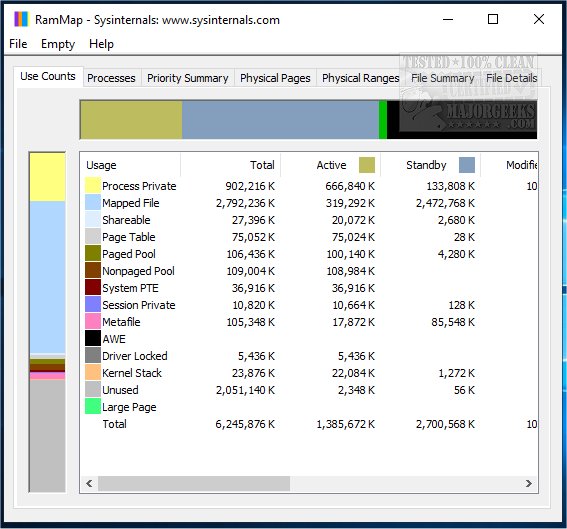
SysInternals has released version 1.62 of RAMMap, a powerful tool designed to provide insights into how Windows manages physical memory. This utility allows users to analyze application memory usage and address specific queries regarding RAM allocation. With RAMMap, users can easily determine how Windows allocates physical memory, the amount of file data cached in RAM, and the memory utilized by the kernel and device drivers.
RAMMap features a refresh capability that updates the display to reflect real-time memory usage and supports saving and loading memory snapshots for detailed analysis. The tool organizes memory usage information across various tabs, including:
- Use Counts: A summary of memory usage categorized by type and paging lists.
- Processes: Displays working set sizes for each process.
- Priority Summary: Shows sizes for prioritized standby lists.
- Physical Pages: Details per-page usage for all physical memory.
- Physical Ranges: Provides insights into physical memory addresses.
- File Summary: Breaks down file data stored in RAM by file.
- File Details: Lists individual physical pages associated with files.
In addition to RAMMap, users may find it helpful to explore related resources such as the Windows Memory Diagnostic Tool, methods for checking RAM speed and available slots, managing virtual memory in Windows 10 and 11, and understanding the distinctions between 32-bit and 64-bit applications.
Overall, RAMMap serves as an essential tool for anyone looking to optimize their system's performance by providing a comprehensive view of memory utilization in Windows. Its user-friendly interface and rich feature set make it an invaluable resource for system administrators and advanced users alike
RAMMap features a refresh capability that updates the display to reflect real-time memory usage and supports saving and loading memory snapshots for detailed analysis. The tool organizes memory usage information across various tabs, including:
- Use Counts: A summary of memory usage categorized by type and paging lists.
- Processes: Displays working set sizes for each process.
- Priority Summary: Shows sizes for prioritized standby lists.
- Physical Pages: Details per-page usage for all physical memory.
- Physical Ranges: Provides insights into physical memory addresses.
- File Summary: Breaks down file data stored in RAM by file.
- File Details: Lists individual physical pages associated with files.
In addition to RAMMap, users may find it helpful to explore related resources such as the Windows Memory Diagnostic Tool, methods for checking RAM speed and available slots, managing virtual memory in Windows 10 and 11, and understanding the distinctions between 32-bit and 64-bit applications.
Overall, RAMMap serves as an essential tool for anyone looking to optimize their system's performance by providing a comprehensive view of memory utilization in Windows. Its user-friendly interface and rich feature set make it an invaluable resource for system administrators and advanced users alike
SysInternals RAMMap 1.62 released
Use RAMMap to gain an understanding of the way Windows manages memory, analyze application memory usage, or answer specific questions about how RAM is being allocated.