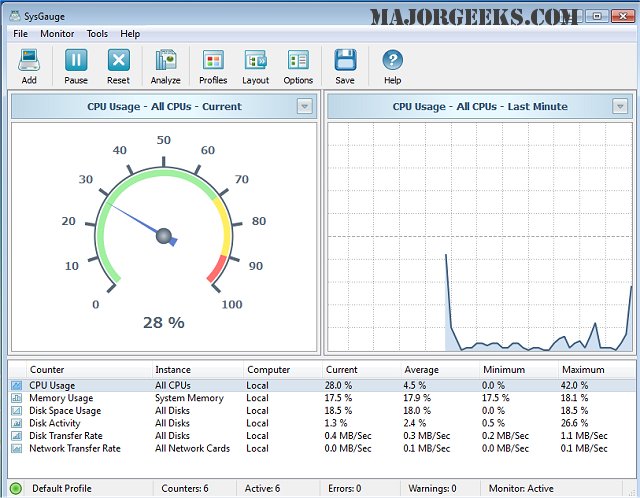
SysGauge 12.5.18 has been released, providing users with a powerful tool to monitor their machine's performance in real-time across multiple categories. The software features nine main inquiry categories: All Counters, CPU Usage, Memory Usage, Disk I/O Activity, Network Activity, Operating System, Process Status, File System, and USB Activity. Each category contains various subsets, allowing users to pinpoint specific areas of interest. The user interface is designed for ease of use, making it accessible for individuals at all technical levels.
Additionally, SysGauge allows users to set personalized limits for various monitoring counters. Users can receive alerts through error or warning messages, notification sounds, or even email notifications if certain parameters fall outside of predefined thresholds. To help users maintain oversight, SysGauge generates periodic status reports that encompass up to 24 hours of continuous monitoring history. These reports can be exported in various formats, including HTML, PDF, Excel, Text, CSV, or XML, enabling easy sharing and analysis.
In summary, SysGauge is an essential tool for anyone looking to maintain optimal system performance, providing comprehensive monitoring capabilities along with user-friendly features for alerts and reporting.
Furthermore, users can explore additional resources on related topics, such as updating their Windows Experience Index Score, identifying hardware components in their computer, and understanding Windows Auto-Tuning. This information can enhance overall system management and performance optimization strategies
Additionally, SysGauge allows users to set personalized limits for various monitoring counters. Users can receive alerts through error or warning messages, notification sounds, or even email notifications if certain parameters fall outside of predefined thresholds. To help users maintain oversight, SysGauge generates periodic status reports that encompass up to 24 hours of continuous monitoring history. These reports can be exported in various formats, including HTML, PDF, Excel, Text, CSV, or XML, enabling easy sharing and analysis.
In summary, SysGauge is an essential tool for anyone looking to maintain optimal system performance, providing comprehensive monitoring capabilities along with user-friendly features for alerts and reporting.
Furthermore, users can explore additional resources on related topics, such as updating their Windows Experience Index Score, identifying hardware components in their computer, and understanding Windows Auto-Tuning. This information can enhance overall system management and performance optimization strategies
SysGauge 12.5.18 released
SysGauge enables you to precisely monitor in real-time your machine's performance in numerous areas.