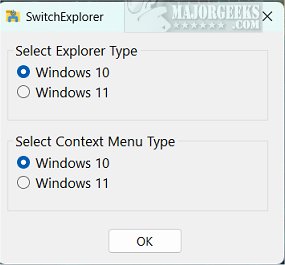
SwitchExplorer version 2.2.1 has been released, offering users an easy way to toggle between the default File Explorer and context menu of Windows 11 and their Windows 10 counterparts. This application is particularly beneficial for Windows 11 users who prefer the classic look and feel of Windows 10, enabling them to switch displays effortlessly.
SwitchExplorer operates as a zero-interface app, providing users with a simple notification when changing between versions. The developer designed the app to modify registry keys directly linked to the ribbon File Explorer, allowing users to avoid the complexities of manual registry edits. For those interested in the specific registry entries affected, detailed information is available in the developer's repository.
In addition to its main functionality, the app serves as a practical alternative for users who appreciate traditional interfaces and seek to maintain a familiar computing environment without the hassle of technical adjustments.
To extend the conversation, users may also find value in exploring additional customization options available in both Windows 10 and 11, such as enabling or disabling the full-screen Start Menu, customizing the Start Menu layout, and managing app visibility. For instance, users can learn how to hide the most used apps or disable Bing search integration within the Start Menu, further tailoring their experience to align with personal preferences. As Windows operating systems continue to evolve, tools like SwitchExplorer will likely remain essential for users seeking familiarity and ease of use
SwitchExplorer operates as a zero-interface app, providing users with a simple notification when changing between versions. The developer designed the app to modify registry keys directly linked to the ribbon File Explorer, allowing users to avoid the complexities of manual registry edits. For those interested in the specific registry entries affected, detailed information is available in the developer's repository.
In addition to its main functionality, the app serves as a practical alternative for users who appreciate traditional interfaces and seek to maintain a familiar computing environment without the hassle of technical adjustments.
To extend the conversation, users may also find value in exploring additional customization options available in both Windows 10 and 11, such as enabling or disabling the full-screen Start Menu, customizing the Start Menu layout, and managing app visibility. For instance, users can learn how to hide the most used apps or disable Bing search integration within the Start Menu, further tailoring their experience to align with personal preferences. As Windows operating systems continue to evolve, tools like SwitchExplorer will likely remain essential for users seeking familiarity and ease of use
SwitchExplorer 2.2.1 released
SwitchExplorer lets you switch between the default File Explorer and context menu in Windows 11 to the Windows 10 versions through a simple app.