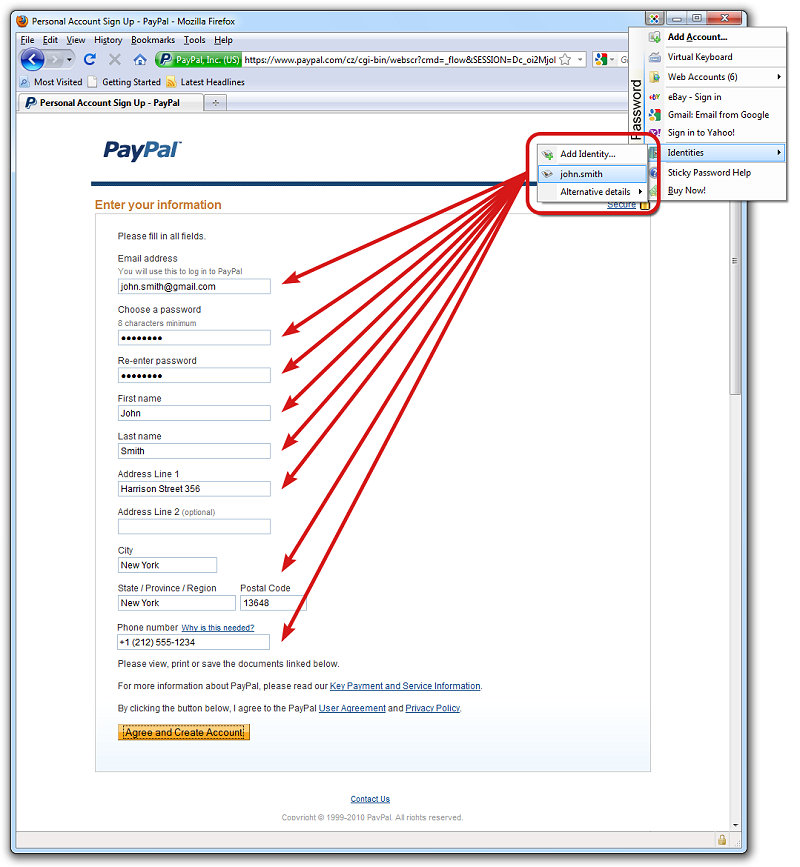
Sticky Password has recently released version 8.9.9.2273, an advanced password management tool that prioritizes online security and efficiency. This software assists users by automatically filling in website forms and login credentials, alleviating the burden of remembering numerous passwords.
Enhanced Security Features
Sticky Password's robust suite of features includes secure password generation, encrypted storage, and device synchronization, ensuring that sensitive information remains protected against unauthorized access. The application employs industry-leading encryption algorithms, such as the military-grade AES, to defend against online threats like phishing, keyloggers, and identity theft.
Key Features of Sticky Password
1. Automatic Login & Form Filling: Sticky Password recognizes password-protected sites, enabling users to log in seamlessly without manually entering credentials.
2. Browser Integration: The tool integrates smoothly with various browsers and applications, ensuring that passwords are readily available when needed.
3. Password Management: With a single Master Password, users can control all their passwords, eliminating the risk of forgotten credentials.
4. Secure Memos: Users can store additional important data securely within the encrypted database.
5. Portable Version: Each license includes a portable version, allowing users to access their passwords from a USB drive anywhere.
Organizational Tools
Sticky Password helps users organize their passwords and accounts efficiently, offering enhanced grouping options and synchronization between desktop and portable versions. It supports major web browsers like Internet Explorer, Firefox, and Google Chrome, providing flexibility across platforms.
Licensing and Accessibility
The software is designed for easy installation and accessibility, with a portable version included in the license that can be used on USB drives. This ensures that passwords are always within reach, regardless of location.
User Experience and Verdict
Sticky Password is recognized for its user-friendly interface and strong security focus. Although some may find its feature set less extensive compared to competitors like LastPass, its competitive pricing and local Wi-Fi syncing capabilities make it an appealing option for users seeking effective password management.
Extension of Content
As cybersecurity threats continue to evolve, the importance of reliable password management tools like Sticky Password becomes increasingly critical. In addition to its existing features, users could benefit from future updates that might include biometric authentication options, advanced AI-driven security alerts, and enhanced collaboration tools for sharing passwords securely with trusted contacts. Moreover, incorporating educational resources about online security best practices within the application could further empower users to protect their digital identities. Overall, as users navigate an increasingly complex online landscape, effective tools like Sticky Password will play a vital role in safeguarding their personal information while enhancing their online experience
Enhanced Security Features
Sticky Password's robust suite of features includes secure password generation, encrypted storage, and device synchronization, ensuring that sensitive information remains protected against unauthorized access. The application employs industry-leading encryption algorithms, such as the military-grade AES, to defend against online threats like phishing, keyloggers, and identity theft.
Key Features of Sticky Password
1. Automatic Login & Form Filling: Sticky Password recognizes password-protected sites, enabling users to log in seamlessly without manually entering credentials.
2. Browser Integration: The tool integrates smoothly with various browsers and applications, ensuring that passwords are readily available when needed.
3. Password Management: With a single Master Password, users can control all their passwords, eliminating the risk of forgotten credentials.
4. Secure Memos: Users can store additional important data securely within the encrypted database.
5. Portable Version: Each license includes a portable version, allowing users to access their passwords from a USB drive anywhere.
Organizational Tools
Sticky Password helps users organize their passwords and accounts efficiently, offering enhanced grouping options and synchronization between desktop and portable versions. It supports major web browsers like Internet Explorer, Firefox, and Google Chrome, providing flexibility across platforms.
Licensing and Accessibility
The software is designed for easy installation and accessibility, with a portable version included in the license that can be used on USB drives. This ensures that passwords are always within reach, regardless of location.
User Experience and Verdict
Sticky Password is recognized for its user-friendly interface and strong security focus. Although some may find its feature set less extensive compared to competitors like LastPass, its competitive pricing and local Wi-Fi syncing capabilities make it an appealing option for users seeking effective password management.
Extension of Content
As cybersecurity threats continue to evolve, the importance of reliable password management tools like Sticky Password becomes increasingly critical. In addition to its existing features, users could benefit from future updates that might include biometric authentication options, advanced AI-driven security alerts, and enhanced collaboration tools for sharing passwords securely with trusted contacts. Moreover, incorporating educational resources about online security best practices within the application could further empower users to protect their digital identities. Overall, as users navigate an increasingly complex online landscape, effective tools like Sticky Password will play a vital role in safeguarding their personal information while enhancing their online experience
Sticky Password 8.9.9.2273 released
Sticky Password will help you stay safe online and save time by filling in website forms and passwords automatically.